[+] Wayc0de's Blog[+]

29/08/11

Hurricane Irene: Last-Minute Survival Tips for Small Businesses

Hurricane Irene is coming fast and will hit the East Coast of the United States within a matter of hours. Hurricanes are a very destructive force of nature bringing the threat of floods, as well as winds capable of uprooting trees and leveling buildings.

The devastation may seem overwhelming, but business must go on as quickly as possible. Here are some tips to consider to help your business bounce back and get up and running as quickly as possible in the wake of Hurricane Irene.

Hurricane Irene 
Hurricane Irene will hit the East Coast within a matter of hours. 

1. Have a Plan. Consider what the impact will be if power and communications are down for a day…or a week. Communicate now--proactively--with suppliers, partners, customers, or other affected parties to explain the situation, and to inform them that business may be interrupted, and you may be unable to communicate reliably, but that business will resume as quickly as possible.

Think about what is absolutely essential to accomplish critical business functions, and come up with a plan to get those functions working again as quickly as possible. If you need to replace equipment--either temporarily or permanently--where will you get it? Other businesses will also be looking for equipment so it may be hard to find.

2. Stay in Touch. Make sure that you have updated contact information for your employees. Follow up to make sure they are safe once Irene blows through, and to let them know the status of the business and when you expect them to return to work.

Identify key personnel and let them know ahead of time that you may need them to help keep things going in the aftermath of the hurricane, and resume business operations as soon as possible.

3. Protect Your Data. Your data should be backed up somewhere safe--in other words, somewhere that is not in the path of the hurricane; where you are confident it can survive the natural disaster so you will still have it if you need it. If you have your data backed up on DVDs or other media that is sitting in a closet in your office, odds are fair it will be destroyed as well.

It is too late at this point to turn to cloud-based solutions. Storing data in the cloud is a great way to protect it in the event of a natural disaster, but there is no way you can get gigabytes of data uploaded in time unless you have some serious bandwidth available.

At this point, your best bet is to use a disaster-proof external drive like those offered by ioSafe. It is late, but the drives are sold at retail outlets like Walmart that operate 24 hours, so you might still be able to pick one up. Alternatively, if you have a standard external hard drive, you might be able to place it inside a fire safe of some sort to give it some protection from the elements.
4. Get Connected. It is almost inevitable that communications will go down for some businesses. That could mean a loss of voice communications, or data, or both. Traditional landlines come in handy in a natural disaster because the phone system can continue working long after the power goes out.

If your business relies on voice-over IP (VoIP) communications like Vonage, Skype, Google Voice, or the VoIP services offered by many cable providers, remember that your Internet is your voice, and when you lose one you lose them both.

It can be handy to have cell phones available from multiple providers. AT&T towers may be down, but Verizon might work fine--or vice versa. It is also helpful if you have smartphones capable of being used as a Wi-Fi hotspot so you have an alternative means of connecting to the Internet if necessary.

Don't forget all of the standard hurricane survival tips--have lots of bottled water, batteries, canned goods (remember the can opener), and so forth. Most of all, stay safe. Hopefully these tips will help you continue doing business right through the hurricane, or resume business as quickly as possible, but none of that matters in the least compared with ensuring your own safety, your family's safety, and the safety of your employees and their families.

nb : pcworld Read More...

How To Protect Yourself From Supercookies

Everybody loves cookies, those little packets of code that websites leave in your browser. We love them because they make Web browsing more convenient by saving our usernames, passwords and other unique data from one session to the next. Marketing companies love them because they uniquely identify visitors and can be combined with traffic logs to compile a profile of your interests and browsing habits.

As long as you are a willing participant, this sort of tracking can be a good thing; browser cookies allow online retailers to tailor their websites to your needs and ensures you are more likely to see advertisements for products and services relevant to your interests. The problem is that lots of unscrupulous companies are using underhanded techniques to sneak cookies into your browser even when you don’t want them. They’re called supercookies, and they can be stopped with a few free utilities and some simple precautions.

Of course, you can disable storage of standard HTTP cookies via your browser’s privacy controls. Unfortunately, many popular websites now track users with unique data packages designed to circumvent your browser’s privacy filter. These souped-up data packages are colloquially known as supercookies, and they typically take advantage of alternate storage areas within your browser to store unique snippets of code and replicate that site’s HTTP cookie in the event you block or delete it from your browser.

With a little time and effort you can manually wipe these supercookies from your computer, but clearing out all the supplementary bits of code that transform a regular cookie into a supercookie is a time-consuming process. For example, to prevent Flash cookies you’ll need to visit the Adobe Website Storage Settings panel and click “Delete All Sites” to clear out any data stored in Flash on your computer, then hop over to the Global Storage Settings panel and disable third-party Flash content from storing data on your computer in the future.


Unfortunately, doing so also ruins the experience of visiting many restaurants, retailers and really any organization that relies heavily on Flash content. If you’re willing to download some free software, it’s easier to clean out any supercookies hiding in your computer with utilities like SlimCleaner and CCleaner.

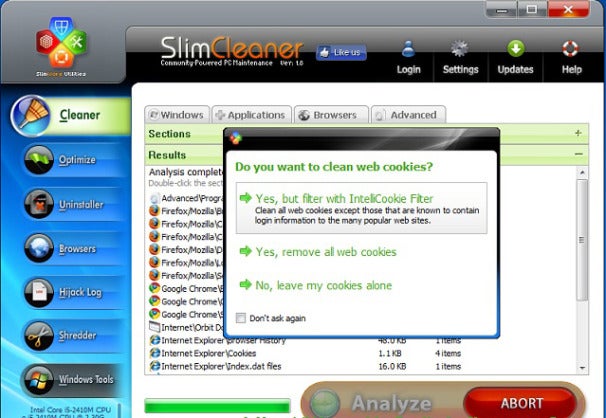
SlimCleaner is an especially smart choice if you are worried about supercookies, as it incorporates an IntelliCookie feature that allows you to save cookies from trusted sites like your bank while deleting everything else. Mac-compatible versions of both utilities are available, though OS X users can also download the free Flash cookie removal app Flush.


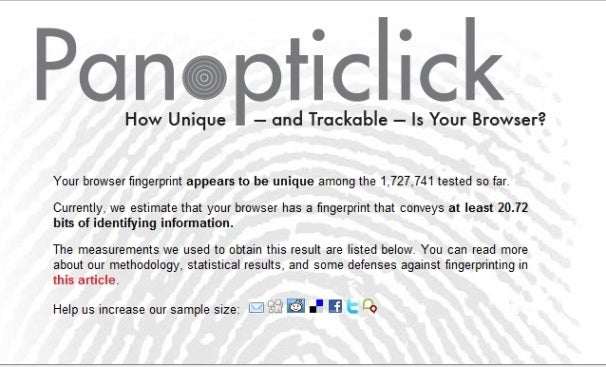
The final step in safeguarding your privacy online is installing third-party software that blocks supercookies from infesting your browser in the first place. Firefox extensions like BetterPrivacy and NoScript make it easy to selectively filter what web scripts are allowed to run on your computer, ensuring that online marketers will have a difficult time tracking you without your permission. You can find out exactly how trackable you are by pointing your browser at the Electronic Frontier Foundation’s Panopticlick website and taking their free browser fingerprint test, which rates how easy it is to uniquely identify you based on what information your browser is sharing and saving. Prepare for the test with these simple precautions, and I think you’ll be pleasantly surprised with the results.

nb : pcworld

Read More...

New Worm Morto Using RDP to Infect Windows PCs

A new worm called Morto has begun making the rounds on the Internet in the last couple of days, infecting machines via RDP (Remote Desktop Protocol). The worm is generating a large amount of outbound RDP traffic on networks that have infected machines, and Morto is capable of compromising both servers and workstations running Windows.

Users who have seen Morto infections are reporting in Windows help forums that the worm is infecting machines that are completely patched and are running clean installations of Windows Server 2003.

"In a new windows 2003 R2 server, I'm noticing every few minutes, svshost.exe [sic] is opening a ton of outgoing TCP 3389 connections.  I ran an a/v scanner over it and it's clean.  Can it be hacked already???  has anyone seen this before?," one user asked in Microsoft's TechNet forum.

On Sunday, the SANS Internet Storm Center reported a huge spike in RDP scans in the last few days, as infected systems have been scanning networks and remote machines for open RDP services. One of the actions that the Morto worm takes once it's on a new machine is that it scans the local network for other PCs and servers to infect.

"A few weeks ago a diary posted by Dr. J pointed out a spike in port 3389 traffic.  Since then the sources have spiked ten fold.  This is a key indicator that there is an increase of infected hosts that are looking to exploit open RDP services." SANS handler Kevin Shortt said in a blog post.

Researchers at F-Secure said that Morto is the forst Internet worm to use RDP as an infection vector. Once it's on a new machine and has successfully found another PC to infect, it starts trying a long list of possible passwords for the RDP service.

"Once a machine gets infected, the Morto worm starts scanning the local network for machines that have Remote Desktop Connection enabled. This creates a lot of traffic for port 3389/TCP, which is the RDP port," F-Secure Chief Research Officer Mikko Hypponen said in a blog post.

"Once you are connected to a remote system, you can access the drives of that server via Windows shares like \\tsclient\c and \\tsclient\d for drives C: and D:, respectively. Monto uses this feature to copy itself to the target machine. It does this by creating a temporary drive under letter A: and copying a file called a.dll to it. The infection will create several new files on the system including \windows\system32\sens32.dll and \windows\offline web pages\cache.txt. Morto can be controlled remotely. This is done via several alternative servers, including jaifr.com and qfsl.net."


It's been quite a while since there was a large-scale Internet worm attack. Once upon a time, worms such as Blaster, Code Red and SQL Slammer were all the rage and found success clogging networks with enormous amounts of scanning traffic and other activity. But those kinds of events have become an anachronism as attackers have turned the attention to for-profit attacks.

nb : threatpost 

Read More...

Microsoft quietly finding, reporting security holes in Apple, Google products

Researchers at Microsoft have been quietly finding — and helping to fix — security defects in products made by third-party vendors, including Apple and Google.


This month alone, the MSVR (Microsoft Security Vulnerability Research) team released advisories to document vulnerabilities in WordPress and Apple’s Safari browser and in July, software flaws were found and fixed in Google Picasa and Facebook.

The MSVR program, launched two three years ago, gives Microsoft researchers freedom to audit the code of third-party software and work in a collaborative way with the affected vendor to get those issues fixed before they are publicly compromised.

[ SEE: Microsoft says Google Chrome Frame doubles IE attack surface ]

The team’s work gained prominence in 2009 when a dangerous security hole in Google Chrome Frame was found and fixed but it’s not very well known that the team has spent the last year disclosing hundreds of security defects in third-party software.

Since July 2010, Microsoft said the MSVR team identified and responsibly disclosed 109 different software vulnerabilities affecting a total of 38 vendors.

More than 93 percent of the third-party vulnerabilities found through MSVR since July 2010 were rated as Critical or Important, the company explained.

“Vendors have responded and have coordinated on 97 percent of all reported vulnerabilities; 29 percent of third-party vulnerabilities found since July 2010 have already been resolved, and none of the vulnerabilities without updates have been observed in any attacks,” Microsoft said.
This week’s discoveries:
  • A vulnerability exists in the way Safari handles certain content types. An attacker could exploit this vulnerability to cause Safari to execute script content and disclose potentially sensitive information. An attacker who successfully exploited this vulnerability would gain sensitive information that could be used in further attacks.
  • A vulnerability exists in the way that WordPress previously implemented protection against cross site scripting and content-type validation. An attacker could exploit this vulnerability to achieve script execution.
Read More...

DHS warns that Irene could prompt phishing scams

As Hurricane Irene barrels toward the eastern seaboard, the U.S. Department of Homeland Security is warning government agencies and private companies to be on the lookout for storm-related phishing attacks and other malicious cyberactivity.

In an alert issued Thursday (PDF), the agency said that cybercriminals go into overdrive during highly publicized physical events such as hurricanes and earthquakes.

[ Learn how to greatly reduce the threat of malicious attacks with InfoWorld's Insider Threat Deep Dive PDF special report. ]

"Both government agencies and private organizations could possibly become recipients of malicious activity, most commonly in the form of socially engineered spear-phishing emails," the alert from the DHS National Cybersecurity and Communications Integration Center said.

"These emails may appear to originate from a reputable source, with the email subject closely aligned to the event and usually of interest to the recipient," it said. "Network administrators and general users should be aware of these attempts and avoid opening messages with attachments and/or subject lines related to physical events."

Clicking on such emails could cause malware such as keyloggers and remote access tools to be downloaded on the user's computer, it said.

The alert is a sign of the growing attention that the DHS, which is responsible for protecting critical infrastructure targets in the U.S, and other security agencies and organizations have begun paying to phishing attacks.

Until relatively recently, phishing was considered mostly a consumer problem. But the use of phishing emails to successfully breach the Oak Ridge National Laboratory, EMC's RSA security division, Epsilon, and the Pacific Northwest National Laboratory have quickly changed that view.

 The speed and sophistication of such attacks after the devastating earthquake and tsunami in Japan earlier this year is but one example.

Barely hours after the Japan tragedies, phishers and other online scammers began use emails, fake websites and malicious downloads to try and steal money and plant malware on user systems.

Security companies such as Symantec said they observed millions of email messages and dozens of phony websites going up in the immediate aftermath of the disaster. In most cases recipients of the email messages were encouraged to click on attachments purporting to show images and videoes of the disasters or pointing users to sites where they could ostensibly make donations to victims.

Similar scams were observed in the aftermath of earthquake in Haiti.

The danger for enterprises is that infected computers could be used as entry points into corporate networks, said Anup Ghosh, founder of security firm Invincea.

In many cases, enterprise users are hit with highly targeted spear phishing email messages that appear to come from people they know.

"Spear phishing is the number one attack vector for enterprises. It is how you get into the network," Ghosh said. The tactic has become one of the most commonly used methods used by cyberattackers to break through corporate security defenses, he said.

"I know of CISOs who have run their own spear phishing tests and gotten click through rates of 60 percent," he said. "There's simply now training your way out of the problem."

nb : infoworld Read More...