[+] Wayc0de's Blog[+]

Tampilkan postingan dengan label Apa Saja. Tampilkan semua postingan

26/09/12

Fimap Tool - Local And Remote File Inclusion With Backbox Linux


Description: LFI ATTACK WITH FIMAP, target DVWA, arm BACKBOX LINUX.

First you need to install DVWA*, then run Apache server (comes with BackBox Linux), then read how to use FIMAP (terminal fimap -h), one c99 shell script (to find one type inurl:c99.txt in Google search box).You will need to set Apache directory permissions, for this you can use this bash script : http://www.linux.re.rs/files/scripts/dirbash.sh. I will show you how to upload shell to vulnerable server and exploit the vulnerability.

* How to install DVWA with BackBox Linux !

http://www.anonimus.re.rs/6562

Author : Nenad Marjanovic
IT nick : ZEROF
Author site : http://www.pentester.iz.rs 
Read More...

25/09/12

Urlcrazy Tool On Backtrack 5 R3


Description: URLCrazy is a tool that can generate and test domain typos and variations to detect and perform typo squatting, URL hijacking, phishing, and corporate espionage. It generates 15 types of domain variants, knows over 8000 common misspellings, supports multiple keyboard layouts, can check if a typo is a valid domain, tests if domain typos are in use, and estimates the popularity of a typo.  

Read More...

Vega Web Scanner On Backtrack 5 R3

  
Description: Vega is an open source platform to test the security of web applications. Vega can help you find and validate SQL Injections, Cross-Site Scripting (XSS), inadvertently disclosed sensitive information, and other vulnerabilities. It is written in Java, GUI based, and runs on Linux, OS X, and Windows. 


Read More...

23/09/12

Tab-Nabbing With Dns Spoofing Using Backtrack


Description: In this Tutorial I have Explained how to use SET ( Social Engineering tool kit) for Tab nabbing and DNS Spoofing using Ettercap to make it more effective in LAN.......

In next tutorial I will Explain How to do it using port 443 of attacker machine instead of using port 80. So that even if victim type https://url instead of http then also he/she get attacked.

Read More...

[Tutor] Setting PPTP pada Linux

Assalamu'alaikum Wr Wb


kalian semua pasti tau VPN,,dimana kita bisa surfing di dunia maya tanpa ketahuan IP asli kita

kemaren ane ada problem ketika selesai order VPN, dimana VPN tersebut tidak support untuk linux

setelah ane browsing, ternyata type yg support untuk linux itu PPTP.

apa itu PPTP? bisa kalian cari sendiri definisinya dari google

oke langsung aja biar gak lama

CEKIDOT !!!

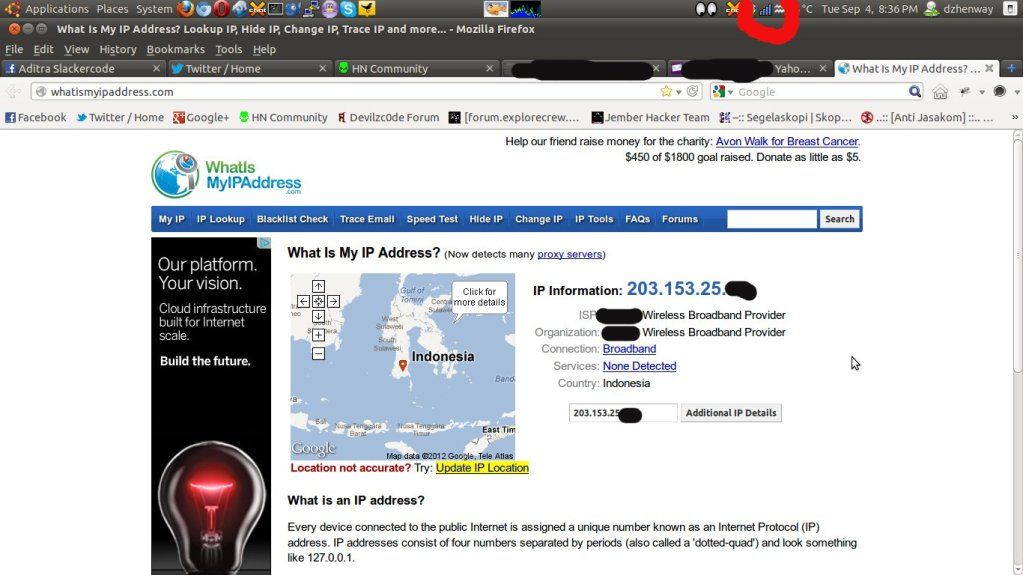
1. Pertama kita cek terlebih dahulu IP kita sebelum memakai PPTP


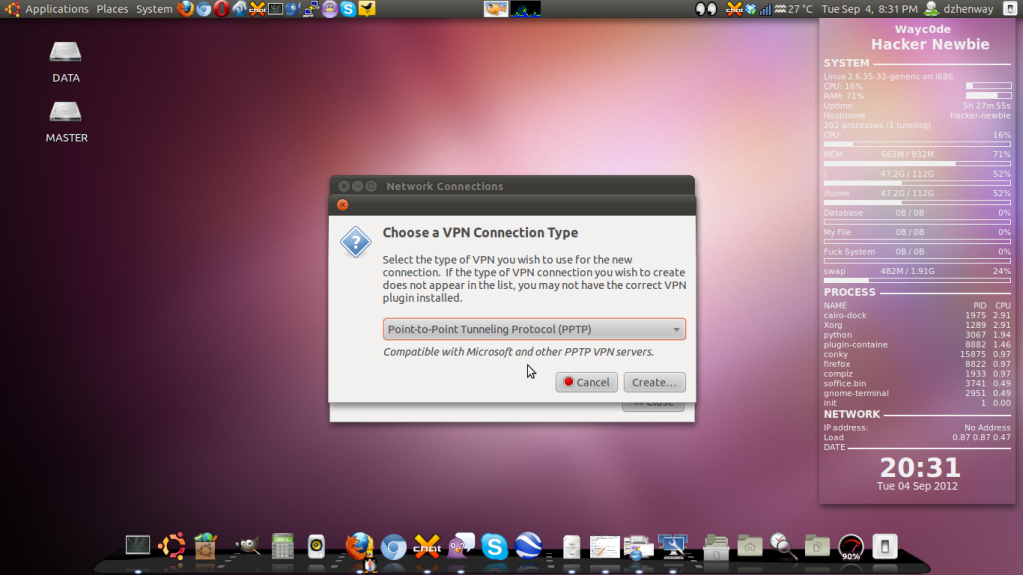
2. Masuk ke menu System -- > Preferences --> Network Connections

3. Masuk ke menu VPN --> Add --> Pilih Point to Point Tunneling Protocol (PPTP) --> klik Create


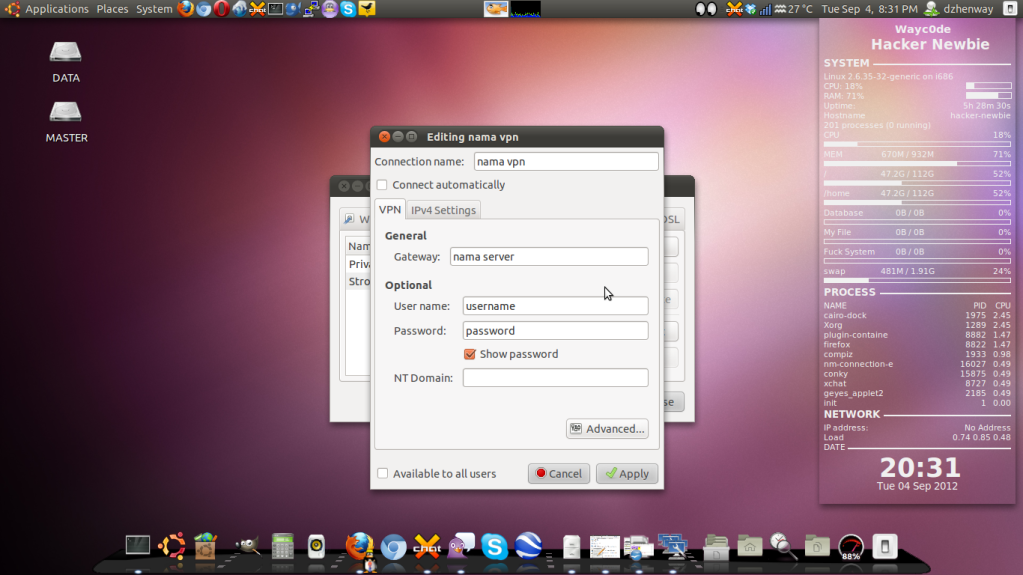
4. a. Isi Connection Name dengan nama VPN kita
   b. Isi Gateway server VPN kita
   c. Isi Username beserta Passwordnya


5. Setelah itu klik menu Advanced yang ada dibawah pojok kanan, dan centang pada bagian Use Point to Point Encryption (MPPE) kemudian klik OK


6. Setelah semua dipastikan benar sekarang klik Apply

7. Jika semua tahap diatas sudah benar, maka secara otomatis VPN akan keluar dengan sendiri

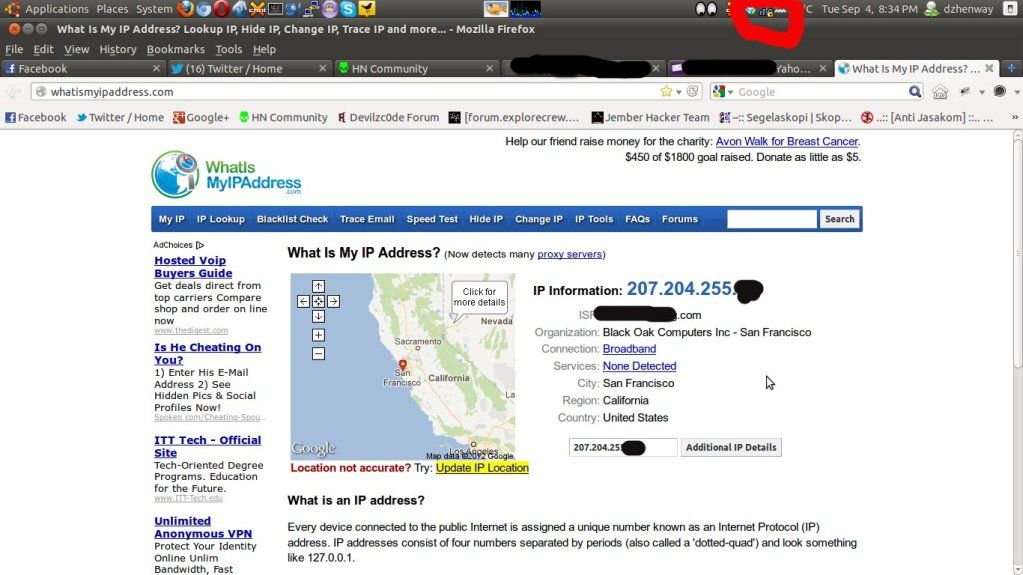
8. Untuk menggunakan PPTP bisa langsung klik gambar Sinyal yang ada di pojok kanan atas, kemudian masuk ke menu VPN Connections. Nantinya disana akan keluar nama VPN yang kita tulis pada step ke 4. Tinggal klik aja pada nama VPN yang keluar dan tunggu beberapa saat maka simbol sinyal akan ada gambar gemboknya

9. Setelah ada gambar gembok kita coba cek IP kita setelah memakai VPN PPTP


yups selamat VPN kalian sudah bekerja dengan baik

untuk mengganti server, bisa kita edit di bagian Gateway-nya

sekarang kita bisa surfing di dunia maya dengan aman dan terkendali

mungkin sekian dulu dari ane, klo ada salah mohon maaf yang sebesar-besarnya

semoga bermanfaat untuk semuanya

Wassalamu'alaikum Wr Wb

Sumber
Read More...

Install Cacti di Ubuntu

Assalamu'alaikum Wr Wb

sebenarnya klo di cari google udah banyak untuk tutorialnya, tapi gak ada salahnya kn ane share disini

pertama-tama kita cari tau apa itu cacti??

Cacti adalah sebuah network monitoring grafis berbasis rrdtool, umumnya digunakan untuk memantau link dan pemakaian bandwidth. Software ini berjalan baik di keluarga nix, termasuk linux dan Unix, dan windows.

oke sekarang masuk ke tahap instalasi

1. Masuk ke Terminal dan login sebagai root kemudian ketikkan command berikut ini

root@hacker:/# apt-get install cacti-cactid

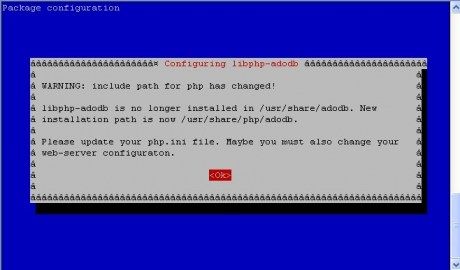
2. Configure libphp-adodb

Jika muncul configurasi tersebut, maka tekan Enter ( OK )


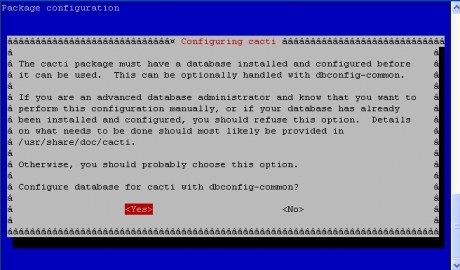
3. Configure dbase for cacti

Konfigurasi dbase cacti dengan dbconfig-common, maka dijawab “YES”.


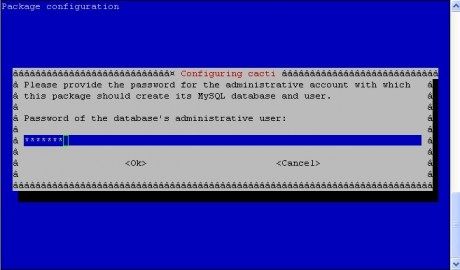
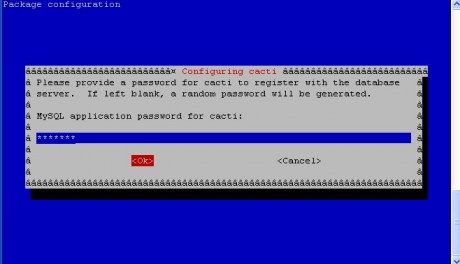
4. Configuring Cacti

a. Isikan password root sql kalian (Jangan Sampai Lupa)


b. Isikan password root sql untuk cacti


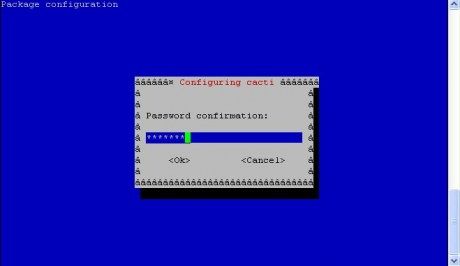
c. confirm cacti sql password yang tadi kalian buat


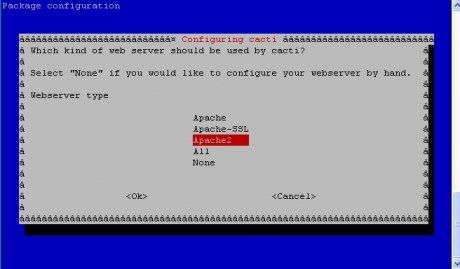
 d. Pemilihan aplikasi webserver (Pilih Yang Apache2)


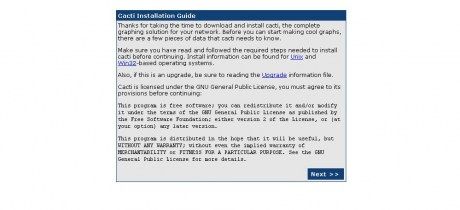
5. Proses Installasi ( Installation Guide )

-Akses ip cacti dengan alamat http://localhost/cacti


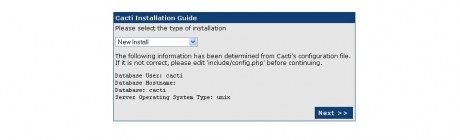
-Pilih new installation, kemudian tekan NEXT


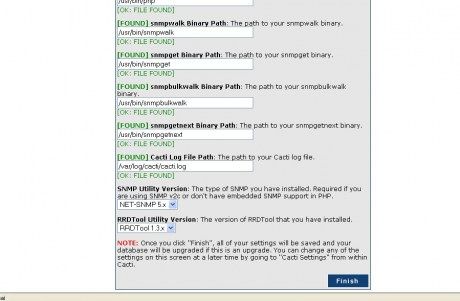
-Klik Finish untuk mengakhiri installasi cacti


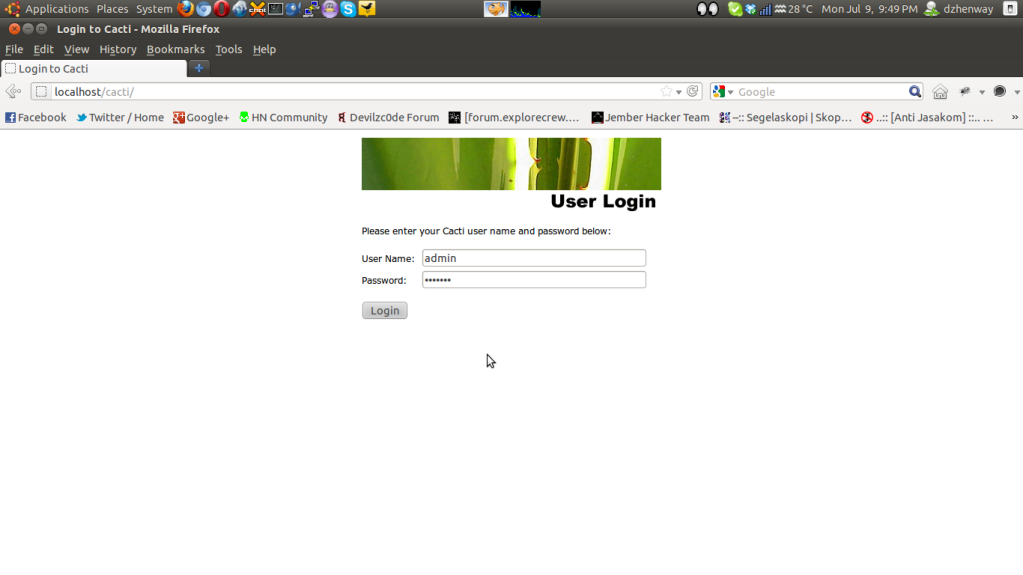
6. Login ke dalam cacti
buka browser dan akses ke http://localhost/cacti


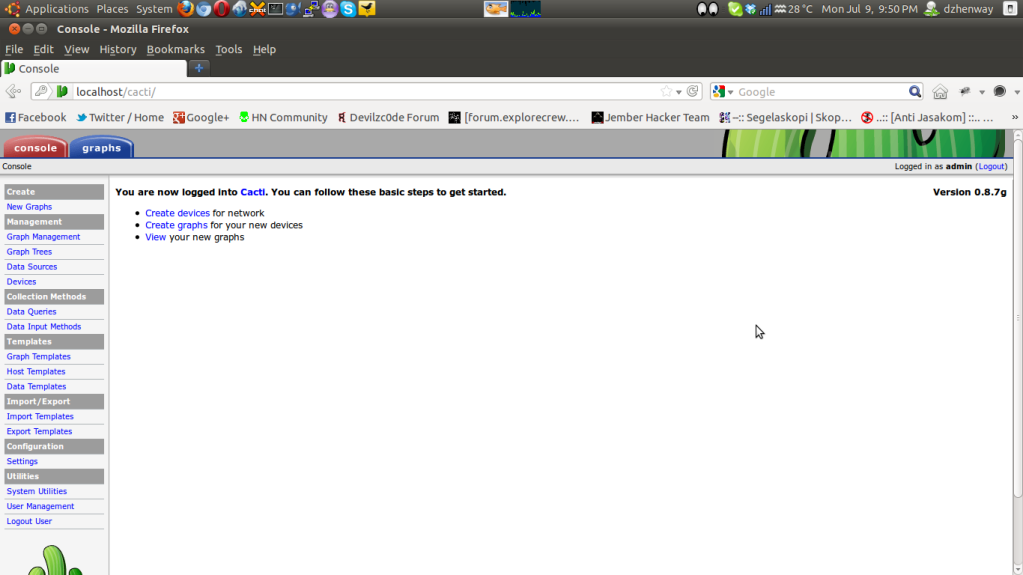
7. Penampakan halaman depan cacti kita


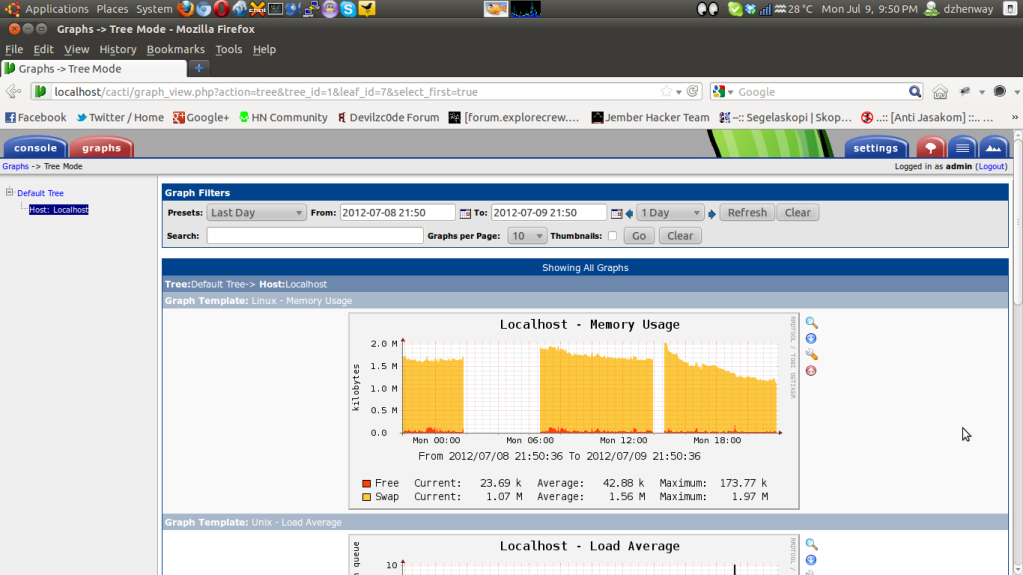
8. Dan sekarang kita bisa melihat aktifitas CPU kita di menu graph


taaraaaaaa..cacti udah berjalan di laptop/PC kita

untuk selanjutnya silahkan di utak-atik sendiri ea
maklum ane juga masih belajar tentang cacti
semoga artikel cupu ini bermanfaat buat kita semua

Wassalamu'alaikum Wr Wb

Sumber
Read More...

Proxy Checker

Assalamu'alaikum Wr Wb

sesuai dengan judulnya,,ane yakin kalian semua tau gmn ending cerita

CEKIDOT !!!

1. Download dulu tool proxy checkernya Proxy Checker

2. Punya list proxy yang mau di cek,, kalau males ngumpulin
nie ane sudah sediain beberapa list proxy yang ane dapet dari segala sumber terpercaya

Download disini ea Gays List Proxy

3. Setelah 2 hal diatas siap,,selanjutnya kita coba jalanin tool checkernya
ketika ada tulisan "Enter Your Proxy Lists" isi aja nama folder proxy list ente
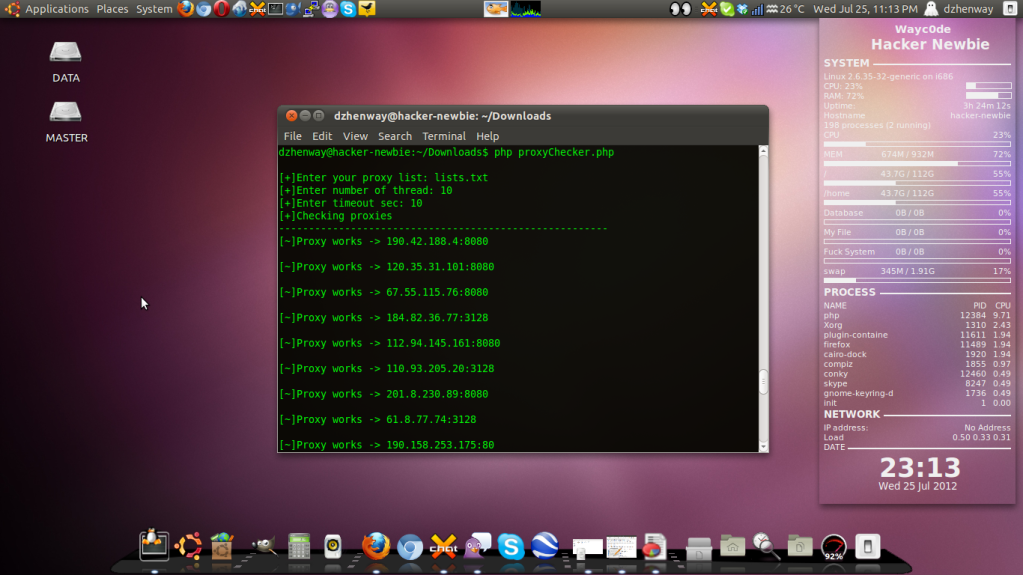
dan selanjutnya bisa di isi sesuai dengan gambar dibawah ini


4. Setelah itu maka kita tinggal tunggu hasilnya aja gays


5. Ketika aksi checkernya sudah selesai,, saatnya kita tes satu-persatu dari hasil checker proxy tersebut. Hasilnya sudah automatis berbentuk .txt dengan nama file works.txt

mungkin sekian dulu acara berbagi
semoga bermanfaat untuk kita semua

akhirnya kata, Wassalamu'alaikum Wr Wb

Sumber
Read More...

65 Open Source Replacements for Security Software

Assalamu'alaikum Wr Wb


sudah lama saya tidak membikin postingan di blog ini, akhirnya hari ini ada niat buat ngisi lagi

CEKIDOT !!!

=============================================================

Anti-Spam

1. ASSP

Replaces: Barracuda Spam and Virus Firewall, SpamHero, Abaca Email Protection Gateway

The self-proclaimed "absolute best SPAM fighting weapon that the world has ever known," ASSP sits on your SMTP servers to stop spam and scan for viruses. Features include browser-based setup, support for most SMTP servers, automatic whitelists, early sender verification, Bayesian filters and more. Operating System: OS Independent.

2. MailScanner

Replaces: Barracuda Spam and Virus Firewall, SpamHero, Abaca Email Protection Gateway

Downloaded more than 1.3 million times by users in 225 countries, MailScanner is a free e-mail security package for mail servers. It incorporates SpamAssassin, ClamAV and a number of other tools to block spam and malware. Operating System: OS Independent.

3. SpamAssasin

Replaces: Barracuda Spam and Virus Firewall, SpamHero, Abaca Email Protection Gateway

"The powerful #1 open-source spam filter," SpamAssassin uses header and text analysis, Bayesian filtering, DNS blocklists, collaborative filtering databases and other techniques to block spam. The project is managed by the Apache Foundation, and it's been incorporated into a number of other open source and commercial products. Operating System: primarily Linux and OS X, although Windows versions are available.

4. SpamBayes

Replaces: Barracuda Spam and Virus Firewall, SpamHero, Abaca Email Protection Gateway

As you might guess from the name, this project offers a group of Bayesian filters for blocking spam. The site includes versions for Outlook, Outlook Express, Windows Live Mail, IncrediMail, Thunderbird, Gmail, Yahoo Mail and others. Operating System: OS Independent.

Anti-Spyware

5. Nixory
Replaces: SpyBot Search and Destroy, AdAware

Nixory removes and block malicious tracking cookies (aka, spyware) from your system. It supports Mozilla Firefox, Internet Explorer and Google Chrome, and it won't slow your system while you surf. Operating System: OS Independent.

Anti-Virus/Anti-Malware

6. ClamAV

Replaces Avast! Linux Edition, VirusScan Enterprise for Linux

This tremendously popular anti-virus engine has been incorporated into numerous security products and calls itself "the de facto standard for mail gateway scanning." The open source version runs on UNIX or Linux mail servers, but the website also offers a version called Immunetfor individual Windows PCs. Operating System: Linux.

7. ClamTK

Replaces Avast! Linux Edition, VirusScan Enterprise for Linux

ClamTK makes ClamAV a little bit easier to use by providing a graphical interface for the anti-virus engine. Like the original, this one runs on Linux and scans on demand. Operating System: Linux.

8. ClamWin Free AntiVirus

Replaces Kaspersky Anti-Virus, McAfee AntiVirus Plus, Norton Anti-Virus

Based on ClamAV, ClamWin protects more than 600,000 PCs from viruses and malware. Note that unlike most commercial anti-virus packages, ClamWin does not offer an on-access real-time scanner; in order to scan incoming files, you'll need to save them and then run a scan manually before opening or running the files. Operating System: Windows.

9. P3Scan

Replaces Avast! Linux Edition, VirusScan Enterprise for Linux

With P3Scan, you can set up a transparent proxy server that provides anti-virus and anti-spam protection. Operating System: Linux.

Backup

10. Amanda

Replaces: Simpana Backup and Recovery , NetVault, HP StorageWorks EBS

Protecting more than 500,000 systems worldwide, Amanda lays claim to the title "most popular open source backup and recovery software in the world." In addition to the community version, it's also available in a supported enterprise edition or as an appliance. Operating System: Windows, Linux, OS X.

11. Areca Backup

Replaces: NovaBackup

Aiming for a balance between simplicity and versatility, Areca offers an easy graphical interface with many options for creating and interacting with archived files. Key features include compression, encryption, delta backup support, archive merges and more. Operating System: Windows, Linux.

12. Bacula

Replaces: Simpana Backup and Recovery , NetVault, HP StorageWorks EBS

Designed for enterprise users, Bacula backs up multiple systems across a network. Commercial support and services for the popular product are available through Bacula Systems. Operating System: Windows, Linux, OS X.

13. CloneZilla

Replaces: Norton Ghost

Created as an alternative to Ghost, Clonezilla can clone single or multiple systems very quickly. It comes in two versions: Clonezilla Live for individual systems and Clonezilla SE for massive networks. Operating System: Windows, Linux, OS X.

14. PartiMage

Replaces: Norton Ghost, NovaBackup, McAfee Online Backup, Carbonite.com

Partimage can create a complete image of your system, which is useful if you need to recover from a full system crash or if you want to configure multiple systems with exactly the same software. It can also create a recovery partition on your drive. Operating System: Linux.

15. Redo

Replaces: Norton Ghost, NovaBackup, McAfee Online Backup, Carbonite.com

Calling itself the "easiest, most complete disaster recovery solution available," Redo offers backup, restore and bare-metal recovery capabilities. Even in the most severe emergencies where you must completely replace a drive, Redo claims it can get you back up and running with all of your programs and files in just 10 minutes. Operating System: Linux.

Browsers

16. Chromium

Replaces: Microsoft Internet Explorer

The open source version of Google Chrome, Chromium tends to be faster and more secure than competing browsers. Key security features include sandboxing, automatic updates, SafeBrowsing and more. Operating System: Windows, Linux, OS X.

17. Dooble

Replaces: Microsoft Internet Explorer

Dooble's developers have created this newer browser with an eye on safety and ease of use. Unlike most other browsers, it automatically encrypts all traffic for greater privacy and security. Operating System: Windows, Linux, OS X.

18. Tor

Replaces: Microsoft Internet Explorer

Tor protects your identity by providing anonymity while you browse the Web. It's used by journalists, activists, whistle-blowers and others concerned that someone might be snooping on their online activities. Operating System: Windows, Linux, OS X.

Browser Add-Ons

19. Web Of Trust

Replaces: McAfee SiteAdvisor Plus

Downloaded more than 33 million times, this popular add-on for Firefox, Internet Explorer, Chrome, Safari or Opera lets users know when they've strayed into websites that are questionable or insecure. It utilizes user ratings to identify sites that perpetuate scams, collect personal information or include unsuitable content, and it ranks them with a green-yellow-red classification system. Operating System: Windows, Linux, OS X.

20. Password Maker

Replaces Kaspersky Password Manager, Roboform

Using the same password all the time puts you at risk, but many people do it anyways because it's so difficult to remember a lot of different passwords. This browser add-on offers a better solution for the problem by creating unique passwords for each site you visit and storing them in an encrypted file that you access with a single master password. Operating System: Windows, Linux, OS X.

Data Removal

21. BleachBit

Replaces Easy System Cleaner

This helpful utility cleans up your system to protect your privacy and improve performance. It frees up disk space by cleaning junk from more than 90 applications, erasing temporary files, deleting cache and browsing history, and "shredding" unwanted files. Operating System: Windows, Linux.

22. Eraser

Replaces BCWipe Enterprise

Like BleachBit, Eraser "shreds" deleted files so that they cannot be recovered. It helps protect sensitive information by rewriting over deleted files several times with random data. Operating System: Windows

23. Wipe

Replaces BCWipe Enterprise

Wipe offers the same functionality as Eraser, but it's for Linux instead of Windows. The site also offers a wealth of information for those interested in learning more about how file "shredding" works. Operating System: Linux.

24. Darik's Boot And Nuke

Replaces Kill Disk, BCWipe Total WipeOut

While Eraser and Wipe delete single files, DBAN securely deletes entire disks. It's very helpful when donating or disposing of an old system. Operating System: OS Independent.

Data Loss Prevention

25. OpenDLP

Replaces RSA Data Loss Prevention Suite, CheckPoint DLP Software Blade, Symantec Data Loss Prevention Product Family

OpenDLP is a "agent- and agentless-based, centrally-managed, massively distributable data loss prevention tool." It allows security or compliance managers to scan thousands of systems simultaneously via agents or perform agentless data discovery against a MySQL or Microsoft SQL server. Operating System: Windows.

26. MyDLP

Replaces RSA Data Loss Prevention Suite, CheckPoint DLP Software Blade, Symantec Data Loss Prevention Product Family

MyDLP can block credit card numbers, social security numbers, or sensitive files from being transmitted via e-mail, printers, the Web or removable devices. In addition to the free community version, it also comes in a paid enterprise version. Operating System: Windows, Linux, VMware.

Encryption

27. AxCrypt

Replaces McAfee Anti-Theft, CryptoForge

With nearly 2.5 million registered users, AxCrypt claims to be the "leading open source file encryption software for Windows." It integrates with Windows Explorer—to use it, you simply right-click to encrypt a file or double-click to decrypt. Operating System: Windows.

28. Gnu Privacy Guard

Replaces PGP Universal Gateway Email Encryption

This Gnu project is a command-line implementation of the popular OpenPGP encryption standard. It supports ElGamal, DSA, RSA, AES, 3DES, Blowfish, Twofish, CAST5, MD5, SHA-1, RIPE-MD-160 and TIGER encryption algorithms. Operating System: Linux.

29. GPG Tools

Replaces PGP Universal Gateway Email Encryption

Mac users can download this version of GPG for a more user-friendly way to encrypt e-mail and files. The website includes quite a bit of help and tutorials for new users, which make it even easier to get started using the app. Operating System: OS X.

30. GPG 4 Win

Replaces Cypherus

And this version offers GPG for Windows users, complete with a GUI. It installs quickly and easily, and it protects both files at rest and mail messages. Operating System: Windows.

31. PeaZip

Replaces WinZip

While it's really a compression utility not an encryption tool, PeaZip also offers strong encryption capabilities, which is why we included it in this section of the list. It also includes two-factor authentication capabilities and secure deletion. Operating System: Windows, Linux.

32. Crypt

Replaces McAfee Anti-Theft, CryptoForge

At just 44KB, Crypt is one of the lightest weight encryption utilities available. And because it can encrypt 3MB worth of data in just 0.7 seconds, it's also one of the fastest. However, it doesn't have a GUI, so you'll need to be comfortable with the command line in order to use it. Operating System: Windows.

33. NeoCrypt

Replaces McAfee Anti-Theft, CryptoForge

NeoCrypt supports multiple encryption algorithms, including AES, DES, Triple-DES, IDEA, RC4, RC5, CAST-128, BlowFish, SkipJack. It runs from an easy-to-use GUI, and it also integrates with the Windows Shell so that you can encrypt and decrypt files right from Windows Explorer. Operating System: Windows.

34. LUKS/CyrptSetup

Replaces PGP Whole Disk Encryption

Short for "Linux Unified Key Setup," LUKS calls itself "the standard for Linux hard disk encryption." While many of the other apps on our list encrypt files one by one, LUKS encrypts your entire drive. Operating System: Linux.

35. FreeOTFE

Replaces PGP Whole Disk Encryption

Like LUKS, this app encrypts an entire drive. With it you can create and encrypt virtual disks on your hard drive. It's also highly portable and can run from a thumb drive. Operating System: Windows.

36. TrueCrypt

Replaces PGP Whole Disk Encryption

One of the most popular open source disk encryption options, TrueCrypt boasts more than 22 million downloads. Thanks to parallelization and pipelining technology, it offers fast reads and writes 0f encrypted information. Operating System: Windows.

Secure File Transfer

37. WinSCP

Replaces CuteFTP, FTP Commander

Extremely popular, the award-winning WinSCP includes an SFTP client, SCP client, FTPS client and FTP client. It offers two different interfaces and also includes an integrated text editor. Operating System: Windows.

38. FileZilla

Replaces CuteFTP, FTP Commander

While WinSCP offers only a client version, FileZilla offers both a client version and a version that allows you to set up your own FTP server. It supports FTP, FTPS and SSH transfer protocol. Operating System: Windows, Linux, OS X.

Forensics

39. Odessa

Replaces EnCase Forensics, X-ways Forensics, AccessData Forensic Toolkit

The Open Digital Evidence Search and Seizure Architecture, aka "ODESSA," offers several different tools that for examining and reporting on digital evidence. This is an older project, but still valuable. Operating System: Windows, Linux, OS X.

40. The Sleuth Kit/AutoPsy Browser

Replaces EnCase Forensics, X-ways Forensics, AccessData Forensic Toolkit

These two apps work together: The Sleuth Kit offers command line tools for conducting digital investigations, and Autopsy Browser offers a browser-based GUI for accessing those tools. The project also now includes a Hadoop framework for large-scale data analysis. Operating System: Windows, Linux, OS X.

Gateway/Unified Threat Management Appliances

41. Endian Firewall Community

Replaces: Check Point Security Gateways, SonicWall, Symantec Web Gateway

Endian Firewall Community can turn any PC (including pretty old ones) into a gateway security appliance complete with a firewall, application-level proxies with antivirus support, virus and spam-filtering for email, Web content and a VPN. Supported versions of the software and hardware appliances are also available on the site. Operating System: Linux.

42. Untangle Lite

Replaces: Check Point Security Gateways, SonicWall, Symantec Web Gateway

Similar to Endian, Untangle Lite also helps users create their own gateway security appliances. In addition, Untangle offers commercial products, and you can download each of the individual apps included in Untangle Lite (firewall, intrusion prevention, attack blocker, etc.) separately. Operating System: Linux.

43. ClearOS

Replaces: Check Point Security Gateways, SonicWall, Symantec Web Gateway

ClearOS combines gateway security functionality with the capabilities of a small business server. It offers networking, groupware, a mail server, a Web server and more. Paid support and hardware are also available. Operating System: Linux.

Intrusion Detection

44. Open Source Tripwire

Replaces Tripwire

Standard Tripwire is now a closed source project, but the community has continued developing the open source version released in 2000. It monitors the content of files and alerts network managers when those files have changed, alerting them to possible intrusions. Operating System: Windows, Linux.

45. OSSEC

Replaces Corero IPS, < ahref="http://www.hpenterprisesecurity.com/products/hp-tippingpoint-network-security/">HP Tipping Point IPS, Sophos HIPS

In addition to file integrity checking, OSSEC also performs log analysis, policy monitoring, rootkit detection and real-time alerting to help prevent and detect intrusions into your network. It's downloaded more than 5,000 times per month and has won numerous awards. Operating System: Windows, Linux.

46. AFICK

Replaces Tripwire

AFICK, short for "Another File Integrity Checker," offers similar functionality as Tripwire. It's portable, fast and runs from a GUI or the command line. Operating System: Windows, Linux.

47. Snort

Replaces Corero IPS, < ahref="http://www.hpenterprisesecurity.com/products/hp-tippingpoint-network-security/">HP Tipping Point IPS, Sophos HIPS

With millions of downloads and more than 400,000 registered users, Snort claims to be "the most widely deployed IDS/IPS technology worldwide." Operating System: Windows, Linux OS X.

Network Firewalls

48. IPCop

Replaces Barricuda NG Firewall, Check Point Appliances

Like most of the other apps on our Firewall list, IPCop turns a PC into a Linux-based firewall to protect your network. This one is designed for home or SOHO users, and it boasts an easy-to-use Web interface. Operating System: Linux.

49. Devil-Linux

Replaces Barricuda NG Firewall, Check Point Appliances

Although it was originally designed to offer firewall and router functionality, Devil-Linux can also operate as a server for many applications, including mail hosting. Created by IT administrators for IT administrators, it boasts top-notch security and excellent customization capabilities. Operating System: Linux.

50. Turtle FireWall

Replaces Barricuda NG Firewall, Check Point Appliances

Designed to be simple and fast, Turtle allows network managers to configure it via a Web interface or by modifying XML files. The website also includes some good introductory information on the nature of firewalls. Operating System: Linux.

51. ShoreWall

Replaces Barricuda NG Firewall, Check Point Appliances

Shorewall doesn't claim to be the easiest Linux firewall to use, but it does claim to be "the most flexible and powerful." You can use it on a system functioning as a dedicated firewall, as a multi-function gateway/router/server or as a standalone GNU/Linux PC. Operating System: Linux.

Network Firewalls (continued from previous page)

52. Vuurmuur

Replaces Barricuda NG Firewall, Check Point Appliances

Vuurmuur is designed to be both simple and powerful. In addition to standard firewall capabilities, it also supports traffic shaping and offers advanced monitoring capabilities. Operating System: Linux.

53. M0n0wall

Replaces Barricuda NG Firewall

Although it was designed for embedded PCs and appliance, m0n0wall can also run on a standalone PC running FreeBSD. It requires less than 12MB of space and boots in less than 25 seconds. Operating System: FreeBSD.

54. pfSense

Replaces Barricuda NG Firewall, Check Point Appliances

This m0n0wall fork is also based on BSD, but is designed for regular computers, not embedded hardware. It's been downloaded more than 1 million times and currently runs on more than 100,000 networks, including large corporations and universities as well as small home networks. Operating System: FreeBSD.

55. Vyatta

Replaces Cisco products

The "core" Vyatta software allows users to make their own firewalls/networking appliances and routers. The company also offers paid software and hardware. Operating System: Linux.

Network Monitoring

56. Wireshark

Replaces: OmniPeek, CommView

Calling itself the "world's foremost network protocol analyzer," Wireshark makes it easy to capture and analyze network traffic. Commercial products and services related to the software are available through Riverbed Technology. Operating System: Windows, Linux, OS X.

57. TcpDump/Libpcap

Replaces: OmniPeek, CommView,

Tcpdump is a command line packet analyzer, and libpcap is a C/C++ library for network traffic capture. Working together, the two provide a good network monitoring solution, but, lacking a GUI, they are not particularly user-friendly. Operating System: Linux.

58. WinDump

Replaces: OmniPeek, CommView

Managed by Riverbed Technology (which also owns Wireshark), WinDump ports tcpdump to the Windows platform. This site also includes the WinPcap library and drivers for traffic capture. Operating System: Windows.

Password Crackers

59. OphCrack

Replaces Access Data Password Recovery Toolkit, Passware

From time to time, everyone needs to recover a lost or unknown password. This password cracker uses the rainbow tables method to recover unknown passwords, and it also includes a brute force module for simple passwords. Operating System: Windows.

60. Access Data Password Recovery, Passware

John the Ripper is particularly good at cracking weak passwords, but in order to use it, you'll need a list of commonly used passwords. You can buy password lists or a pro version of the software from the same site. Operating System: Windows, Linux, OS X.

Password Management

61. KeePass Password Safe

Replaces Kaspersky Password Manager

This popular password manager stores all of your passwords in an encrypted database. You'll only need to remember one master password, while this easy-to-use, lightweight app helps protect you from identity thieves. Operating System: Windows.

62. KeePassX

Replaces Kaspersky Password Manager

If you use OS X or Linux, try this fork of KeePass. Plus, it adds a few features not in the original and runs on Windows as well. Operating System: Windows, Linux, OS X.

63. Password Safe

Replaces Kaspersky Password Manager

Downloaded more than 1 million times, Password Safe is another popular open source option for protecting your passwords. Like KeePass, it's lightweight and stores your encrypted passwords in a database so that you only need to recall one master password. Operating System: Windows.

User Authentication

64. WIKID

Replaces Entrust IdentityGuard, Vasco Digipass, RSA's SecurID

WiKID boasts "two-factor authentication without the hassle factor." In addition to the free community version, it also comes in a supported enterprise version which also adds additional functionality. Operating System: OS Independent.

Web Filtering

65. DansGuardian

Replaces McAfee Family Protection

NetNanny, CyberPatrol

This award-winning content filter uses phrase matching, PICS filtering, URL filtering and other methods to block objectionable content. Note that this software does not run on individual PCs; it runs on an OS X or Linux server to protect the rest of your network. Operating System: Linux, OS X.

=============================================================

mungkin sekian dulu dari ane, semoga bermanfaat bagi kita semua

wassalamu'alaikum wr wb


Sumber Read More...

20/11/11

Tutorial Wordpress Scanning

Assalamu'alaikum dan salam sejahtera buat kita semua
ketemu agy ma ane yg newbie nie bangga
kali ini ane akan memberikan sedikit tutor mengenai Scanning Wordpress dan

tanpa banyak bacot langsung ke topic utamanya ea

CEKIDOT !!!

1. Download software wordpress scanner disini wp-scan

==============================================================

-=- kita akan menjalankan wordpress scanner

setelah di download,, extract dulu file tersebut

buka terminal dan ketikkan command berikut ini :


cd Downloads
cd WP-SCAN
perl wp-scan.pl target.com
ex : perl wp-scan.pl www.webhostingiix.com

setelah proses scan selesai,,kalian bisa melihat hasilnya(proses nya ga nampak disana)
ntar ada report kalo udh finished, bisa dilihat hasilnya di sqli-bugs.txt di folder wp-scan tadi

selanjutnya kalian bisa melakukan penginjectkan terhadap target
===========================================================================

silahkan tunggu sampai selesai dari proses scanning

nantinya disana akan tertera mana saja yang vuln

setelah selesai semuanya,,kita tinggal nyari exploitnya saudara-saudara ngakak

untuk nyari exploitnya bisa cari dimana saja ngakak

sekian dulu tutor cupu dari ane mewek

semoga bermanfaat buat kita semua belajar

akhir kata dari ane, wassalam bangga

nb : vba & ArRay Read More...

Tutorial Joomla Web Scanner 1.7

Assalamu'alaikum dan salam sejahtera buat kita semua seneng

sudah lama tidak update blog

oke langsung saja,,kali ini ane akan memberikan sedikit maenan buat tmen2 semua

sesuai dengan judulnya "Joomla Web Scanner 1.7"

dengan melihat judulnya saja,pasti temen-temen sudah pada ngerti tools ini buat apa

CEKIDOT !!!

1. download dulu toolsnya Joomla-Scan

2. setelah di download mari kita extract file tersebut

3. kemudian kita akan menjalankan proses scanning target

pertama-tama kita lihat dulu command untuk tool ini

ketikkan = ./joomlascan/pl help

nantinya akan keluar seperti ini


[Image: joomla1.png]

Usage:  ./joomlascan.pl -u <joomla_url> [options]

    == Options ==
      -p <string:int>  = proxy:port
      -a               = Admin folder (default '/administration')
      -v               = Check version
      -c               = Check components
      -f               = Check firewall
      -co              = Check bugs in core (require -v)
      -cm              = Check bugs in components (require -c)
      -all             = Check all (default)
      -ot              = Output to text file
      -oh              = Output to html file
      -update          = Search for updates
      -force-update    = Force to download updates
      -about           = About joomlascan
      -version         = Print version info
      -h, -help        = This help

    == Examples ==
      To scan running joomla version and components:
         $./joomlascan.pl -u www.host.com -v -c

      To scan version and core bugs:
         $./joomlascan.pl -u www.host.com -v -co

4. saatnya beraksi dengan mengetik command berikut ini

./joomlascan.pl -u www.target.com -v -co

tunggu sampai selesai proses scanning,,ngerokok dulu mas bro ngakak

setelah selesai akan seperti ini hasilnya

mungkin segitu dulu tutor cupu dari ane

semoga bermanfaat bagi kita semua

akhir kata dari ane,,wassalam bangga Read More...

12/11/11

Apple's iOS 5.0.1 is out - should you upgrade?

Apple's latest iOS update is out.

The new version bumps iOS5 up to 5.0.1, and is Apple's first OTA update.

OTA stands for "over-the-air", and means that you can download and apply the update directly from your iDevice.
You no longer need to download the entire firmware file to your computer - including yet another copy of everything which hasn't changed in iOS - and push it to your device.
(OTA updating isn't yet mandatory. If you prefer to keep full copies of each iOS firmware distro, you can still use the download-and-install-with-iTunes method.)

According to Apple, the highlights of the 5.0.1 update are that it:
* fixes bugs affecting battery life,
* adds Multitasking Gestures for the original iPad,
* resolves bugs with Documents in the Cloud, and
* improves voice recognition for Australian users using dictation.

Strewth! That last one's a bonzer boost for blokes and sheilas everywhere! Gives an Aussie something worth lifting a tinnie to after the Baggy Green got such a big hiding from the South Africans in the cricket!

Importantly, 5.0.1 also fixes a number of security flaws, including a remote code execution (RCE) vulnerability involving font handling, found by Erling Ellingsen of Facebook. RCE means that a cybercriminal might be able to trick your device into running software without asking you, even if you're just browsing the internet.

Interestingly, Charlie Miller's recent and controversial App Store hole has also been patched. Miller showed how to write an innocent-looking App which, once approved by Apple, could fetch and run unapproved software.

Miller was unceremoniously banned from the Apple Developer scene for at least a year; there's no word from Apple, however, on whether he'll be readmitted now the hole is fixed.

Jailbreakers will be pleased to note that devices suitable for running a jailbroken iOS5 - a list which sadly still excludes the iPhone 4GS and the iPad 2 - can happily run a jailbroken iOS5.0.1.

If you are a jailbreaker, however, note that there is not yet any way to go back to iOS5.0 once you've moved on to 5.0.1.
That means that you'll never be able to use Charlie Miller's code-signing vulnerability for jailbreaking purposes in the future, for example if an iPad 2 jailbreak appears which relies on it.

And that leaves us with one question: should you update?
Some reports suggest that 5.0.1 brings with it a raft of new problems, and that the update might not, after all, fix your battery issues.

But these complaints are still anecdotal and unscientific, so if you trust Apple and you're not into jailbreaking, I'd suggest updating to 5.0.1 as soon as you conveniently can.

Ellingsen's and Miller's vulnerabilities may not have made it to Apple's highlights list, but each of these bugs on its own can be considered sufficiently important to warrant a prompt update.
Read More...

Free Android antivirus software is 'useless,' says testing firm

The malware scanners from minor players typically catch less than 10 percent of malicious software

Free Android antivirus software is 'useless,' says testing firm
Consumers and workers who install free Android antivirus scanners from relatively unknown developers are mostly wasting their time, an independent testing firm has found. "During our tests, we found out that the majority of free products are -- to make it short -- useless," says Andreas Marx, CEO of AV-Test. Of all the major mobile platforms, Android is at most risk for malware.

The German firm tested seven free antivirus applications for the Android platform and found that the best program detected only one-third of resident malware, and all others detected less than 6 percent. The best performer, Zoner Antivirus Free, detected 8 of 10 malicious programs during installation, while the other applications detected at most 1 of the 10 malicious programs, according to the firm's analysis (PDF).

The company tested Zrgiu's Antivirus Free, BluePoint Antivirus Free, GuardX Antivirus, Kinetoo Malware Scan, LabMSF Antivirus beta, Privateer Lite, and Zoner AntiVirus Free. Four of the free antivirus program did not detect any of the 172 resident malicious programs used as a test base; another detected only 2. The programs also had little success in detecting malware during installation, with three of the programs detecting no malware and three others detecting a single program. Zoner Antivirus Free was the only standout of the bunch, detecting 32 percent of resident malware and 80 percent of malware during installation.

The firm compared the results to antivirus offerings from established security firms F-Secure and Kaspersky, which detected more than 50 percent of resident malware and blocked all 10 malware samples during installation.

The company plans to widen the testing for its next report to include antivirus programs from commercial vendors as well.


Read More...

Anonymous and LulzSec trawl Google Code search for security holes

Low Orbit Ion CannonExotically named hacking tools such as Low Orbit Ion Cannon and #RefRef have garnered plenty of headlines over the last few months but a new report suggests that the world's favourite search engine might be an equally important weapon in the arsenal of cyber-criminals and hacktivists.

The report explains how a simple search on Google Code is all that's needed to uncover a wealth of information that can be used to break into websites, cloud-based services and secure networks.

Google's Code Search is a tool that makes it easy for those with technical know-how to search the vast amount of computer code that is publicly available online.

Researchers from IT security consultancy Stach & Lui report that hacking groups such as Anonymous and LulzSec are using Google Code search for a number of nefarious activities.

With a few well-crafted searches they can uncover passwords for cloud services, configuration files for Virtual Private Networks and find code  that is vulnerable to common website hacking tactics such as SQL injection.

While the findings provide a much-needed wake up call to online businesses, admins and developers, they also offer a fascinating insight into the motivation of hacking collectives such as Anonymous and LulzSec.

According to Stach & Lui ‘Google Hacking’, as the technique is known, is believed to be Anonymous and LulzSec’s primary means of identifying potential targets.
Rather than being motivated by politics or injustice, hacking groups may simply be targeting organisations because Google Code search has turned up a vulnerability too tempting to ignore, making them less political action groups, more malicious 21st century Wombles.

So what can online businesses do to protect themselves from these online, evil Uncle Bulgarias?

The first line of defence is to make sure that developers are following established best practice and that executives are creating a culture where best practice is encouraged and supported. Including passwords in code has always been a bad idea and techniques to prevent and detect SQL injection vulnerabilities are well established.

Businesses should also prepare so that if they are successfully attacked after a data leak they don't lose their shirt. Data stored in the cloud can be rendered useless to attackers by the simple expedient of encrypting it.

Stach & Lui warn that in the businesses using cloud services should also take a close look at the small print; many cloud service providers state that they don't accept responsibility for leaks.

For more on this take a look at the Stach & Lui's Pulp Google Hacking presentation.
Read More...

10/11/11

Adobe says goodbye to Flash for mobile platforms

Adobe product management team has sent a briefing to Adobe's partners describing the future direction of the development for multi-platform mobile application development tools.

From the security point of view, the biggest and the most welcome news is the announcement of the end of the development of Adobe Flash player for mobile platforms, except for critical security and bug fixes.

Unfortunately, even if the death of Flash for mobile platforms is imminent, Flash for desktop platforms is still very much alive. Adobe Flash vulnerabilities, together with Java virtual machine and Adobe Reader vulnerabilities, have been the most common causes for drive-by download malware infections.

It is yet uncertain what is the future of Flash on desktop, but let us hope that the widespread acceptance of HTML5 will drive Adobe in the right direction of killing Flash players on all remaining platforms.

The move comes after a pressure by iPhone and iPad users which have been frustrated by not being able to access websites built in Flash since Apple announced its decision to exclude Flash support from iOS based devices.
Was Steve Jobs right about Flash after all?
Read More...

Apple Bans Security Researcher Charlie Miller For Exposing iOS Exploit

The latest wave in the infosec world is that Apple has banned the well known security researcher – Charlie Miller – from it’s developer program for exposing a new iOS exploit.

It’s not really the smartest move as I’m pretty sure anyone as smart as Charlie Miller still has plenty of options – use another person’s account, sign up another account with a different identity, hack the phone without the developer program access and so on..

Really it’s quite a harsh move from Apple and it’s not going to make them any friends in the security industry.

Apple has banned well-known security researcher Charlie Miller from its developer program, for creating an apparently benign iOS app that was actually designed to exploit a security flaw he had uncovered in the firmware.

Within hours of talking about the exploit with Forbes’ security reporter Andy Greenberg, who published the details, Miller received an email from Apple: “This letter serves as notice of termination of the iOS Developer Program License Agreement … between you and Apple. Effective immediately.”

Based on Greenberg’s follow-up story, Apple was clearly within its rights to do so. Miller created a proof-of-concept application to demonstrate the security flaw and how it could be exploited by malicious code. He then hid it inside an apparently legitimate stock ticker program, an action that, according to Apple, “violated the developer agreement that forbid[s] him to ‘hide, misrepresent or obscure’ any part of his app,” Greenberg wrote.

He quoted Miller, who works for security consultancy Acuvant, “I’m mad. I report bugs to them all the time. Being part of the developer program helps me do that. They’re hurting themselves, and making my life harder.”

In a way though, you have to agree that Miller did violate the very specific developer program agreement by hiding the PoC inside a legitimate application. That probably wasn’t his smartest idea, but then again it’s helping Apple and he’s not doing it in a malicious way to infect people – he’s doing it as a security researcher.

Apple should be more proactive on working with people like this, people who are actually fixing bugs in their products for free and improving the user experience.

It’s the way Apple operates though, secretive, exclusive, domineering etc. If you don’t do things their way, screw you.


Miller, a former National Security Agency staffer, is a well-known “white hat” hacker (he made Network World’s recent list of “Security All Stars”), with expertise in Apple’s Mac OS X and iOS platforms, including the Safari browser, and in Android. Miller “has found and reported dozens of bugs to Apple in the last few years,” Greenberg noted. Miller reported the latest one barely three weeks ago, and it was Greenberg’s public account of it yesterday, in advance of a planned public presentation by Miller next week, that got the researcher kicked out of the developer program.

The vulnerability is a fascinating exercise in information security sleuthing. Miller uncovered a flaw introduced in Apple’s restrictions on code signing on iOS devices. Code signing is a process by which only Apple-approved commands run in device memory, according to Greenberg’s account.

Miller began to suspect a flaw when Apple released iOS 4.3 in March. He realized that to boost the speed of the mobile Safari browser, Apple for the first time had allowed javascript code from a website to run at a deeper level in memory. This entailed creating a security exception, allowing the browser to run unapproved code. According to Greenberg’s story, Apple created other security restrictions to block untrusted websites from exploiting this exception, so that only the browser could make use of it.

Miller wasn’t the only one to notice that Apple had done something different with Safari in iOS 4.3, but many didn’t understand what was actually happening. Various news sites and bloggers claimed that Web apps running outside of Safari, and its new Nitro javascript engine, were slower. Some suggested that Apple was deliberately slowing them down to make Web apps less attractive than native ones.

The way in which Miller uncovered the flaw once again shows his technical brilliance – something which Apple really should be harnessing rather than turning away.

A lot of people noticed changes with iOS 4.3, but couldn’t actually figure out what was going on. Well that’s what we know in the public realm anyway, no doubt the bad guys had their eyes on it and were digging in with much more malicious exploits.

It basically seems like a way to bypass any kind of code validation by Apple and execute arbitrary code from an attack server – dangerous indeed.
Read More...

06/11/11

Fresh Phish disguised as a PayPal Urgent Account Review Notification

No Phishing Creative Commons photo courtesy of alex_lee2001's Flickr photostreamWhile browsing the web this evening waiting for thotcon 0x3 general admission tickets to go on sale, my wife's spidey senses were tingling when she asked me, "Is this a scam?"

Turning towards her monitor I see she has an email open inside her webmail account. The email has a pretty good sense of urgency written into it that compels the reader to follow the instructions provided and protect their information.
PayPal phish
It begins:
"As of the 3rd of November 2011, our security system has blocked unusual charges to a credit card linked to your account."
And concludes:
"Sincerely, PayPal Account Review Team"
Unfortunately, the average person who does not read Naked Security might easily be duped of their PII (Personally Identifiable Information).

Phishing scams are nothing new. Hopefully, if people stopped falling for them, then perhaps the phishing scams might stop?
It really comes down to education and great protection (for when education fails).
Mal/Phish-A Sophos Anti-Virus detectionThe home use version of Sophos Endpoint Security and Control did a fantastic job of catching the attack as Mal/Phish-A.

The home use version is available to Sophos customer's employees. Check with your employer if the home use program is available at your organization before installing Sophos software willy nilly.

I spoke earlier in the week with a security professional who sent 500 spear phishing attacks internally to his colleagues. Of the 500 emails sent, 25 people responded by completing the form and surrendering their information.
While a 5% rate may seem small, he felt even 1% was too high. Education helped a lot, but not completely. Do you agree?
When read, this fresh phish posing as PayPal immediately puts the recipient into an emotional state that their account was compromised and their funds are in jeopardy which then clouds their judgement.

Since PayPal is a trusted name in the electronic payments industry, they of course have controls to prevent fraudulent transactions (but no one is perfect). This phish takes advantage of that trust by explaining that the breached account has been locked for your protection.

Attached HTML phish fileNow to regain access to your funds it's imperative to download the attachment and complete the form.

After downloading and opening the attachment it will open your web browser. As you can see, this web page looks very genuine and might lower your guard into believing it really came from PayPal.
PayPal phishing site

There are a few mistakes in this poorly executed phish which caused education to prevail over emotion.

The most basic one is that there isn't a PayPal email address associated with the inbox which received this phish.

Another one to point out is that the (From: "PayPal") is really not from PayPal.
The phisher used a domain name pp-redacted-.com which based on a whois look up doesn't have anything to do with PayPal. It belongs to an instrumentation company out of Massachusetts that happens to have similar initials as PayPal.
While my wife isn't a security professional or an expert with computers, her education to not trust every email in her inbox (beyond spam) triggered a gut feeling to think more clearly.

If it doesn't feel right, then it's not. Go with your gut!
Until next time, stay safe and secure online.
Read More...

Apple Security Chief Reportedly Leaves Company

Apple’s vice president of global security has reportedly stepped down roughly two months after the surface of news reports that an iPhone prototype had gone missing for the second time in less than two years.

According to reports, John Theriault, who came to Apple from Pfizer and was a former FBI agent, has retired in the wake of controversy regarding the device's disappearance and the subsequent efforts to track it down. Apple did not return a request for comment.

Nevertheless, Theriault’s departure follows a public relations dustup that began when an Apple employee left the prototype at a bar in San Francisco. The company's attempts to find the device led it to 22-year-old Sergio Calderon, who has said members of Apple's security team showed up at his home in San Francisco with police to search for the phone. According to Calderon, he only let the Apple investigators in because he thought they were police. However, the San Francisco Police Department - which initially denied involvement - has said that while there were officers at the scene, the search itself was conducted by the Apple employees.

The device, believed to have been a prototype of an iPhone 4S, was not found during the search. A lawyer for Calderon has reportedly threatened a lawsuit against Apple.

The latest case of the missing prototype echoes the disappearance of an iPhone 4 prototype in 2010. In that incident, an Apple employee left the phone at a bar called Gourmet Haus Staudt in Redwood City, Calif. When the phone was discovered, it was sold to the tech blog Gizmodo, which dissected the device and published pictures. This ultimately led investigators to raid the home of a Gizmodo editor. Two men were charged with selling the phone to Gizmodo and were sentenced to probation earlier this year. No one from Gizmodo was charged.

In the aftermath of the most recent incident, Apple was found to have posted job listings for a “product security manager” who would be responsible for “overseeing the protection of, and managing risks to, Apple’s unreleased products and related intellectual property.”
Read More...

Open 'Facebook killer' survives on cash donations

Diaspora, the social network that sells itself as a privacy-conscious alternative to Facebook, is relying on user donations instead of advertising to get it going.

And by contrast to its other competitor, Google+, Diaspora also allows pseudonyms. The decentralised service aims to address some of the multitude of privacy and content control issues that have dogged Facebook and, arguable to a lesser extent, Google+, while still giving users the ability share content and ideas with their friends online.

Users retain the copyright of uploaded photos and the like, which is only shared among groups that users actively define, not friends-of-friends or the whole network (often the default options on Facebook).


The service was launched in November 2010 and remains in alpha. However having signed up to try the invitation-only service months ago, El Reg finally received an invitation to try it on Thursday, so things appear to be moving (albeit slowly). The emailed invitation (extract below) was nothing if not enthusiastic:

Finally – it's here

The social network you have been waiting for has arrived. Revamped, more secure, and more fun, DIASPORA* is ready to help you share and explore the web in a whole new way.

Sign up now

Last month the developers behind the software – students at New York University's Courant Institute of Mathematical Sciences – began soliciting donations via PayPal. Diaspora's account was frozen for a short while by the eBay-owned payments biz, without explanation, but has since been restored. The site added other donation methods, including BitCoins, following the episode.

Once signed up to Diaspora, users are immediately invited to link their Diaspora and Facebook accounts to "speed things up a bit" and "enable cross-posting".

This may help populate a profile, but we can't help thinking that linking to Facebook creates privacy concerns all by itself and runs against Diaspora's aims to make "privacy controls both clear and straightforward". You can also add links between Diaspora and Twitter accounts or import contacts from email accounts into Diaspora.

Users are invited to use #hashtags to classify posts and find people who share their interests. They are presented with a "stream" populated with all of their contacts, tags they follow, and "posts from some creative members of the community" who have apparently chosen to share comments, video clips and pictures with everyone on the network. Contents are arranged in "aspects" – friends, family, work colleagues etc – on the site.

There's a lot of help for newbies as well as the facility to ask questions. The interface is clean and well-designed, perhaps partly because there's only one application on offer, Cubbi.es, which offers a way to collate photos. There's also a messaging feature. Overall the web interface is much closer in look and feel to Twitter than Facebook.

The site is useable but still a work in progress, as its alpha designation implies. Upcoming features promised include an ability for users to export their data and to create communities.

Diaspora is based on open-source technology. Early versions of its code were riddled with all manner of security holes, so cautious progress towards a full launch - adopting the open-source ethos of quickly fixing bugs as and when they arise - may be just as well.

There's also the capacity management issues to think about: after all, it's a site run on a modest budget, partially helped by T-shirt sales, and running as a not-for-profit concern.
Read More...

05/11/11

Anonymous abandons plan to expose Mexican drug cartel collaborators

Hacker group backs away from exposing people it believes are connected to Zetas cartel after alleged threat of killings

A plan by the international hacker movement Anonymous to expose collaborators of Mexico's notorious Zetas drugs cartel has come to an abrupt end. A US activist backed away from publishing the names after an alleged counter-threat of mass retaliatory killings.

"This moves the operation from being a risk to knowing that I would be murdering people," Anonymous participant Barrett Brown told the Guardian on Friday.

Brown's withdrawal from Operation Cartel puts an end to one of the most bizarre and confusing episodes in Mexico's drug wars.

It began with a video which appeared online in early October and promised to reveal the identities of people working with the Zetas unless the cartel released an Anonymous member kidnapped in the Mexican city of Veracruz.

The video prompted furious online debate: while Anonymous has previously targeted business and government websites and databases around the world, it was unclear how it could confront Mexico's amorphous – and deadly – drug trafficking organisations. Conflicting messages appeared on Twitter and other social networking sites, with some activists saying the operation had been cancelled while others pledged to continue.

This culminated in Mexico on Thursday when Spanish-speaking Anonymous participants, who had previously pledged to continue, announced that the Zetas had let the kidnapped member go.

They also said that she carried with her a message from the cartel threatening to kill 10 people for every person named and that they had decided to abandon their plans.

Brown, a prominent Texas-based activist and one of the few willing to be named, initially said Mexican hackers had promised to give him information on Zeta collaborators that they had taken from Mexican government sites and that it would be released in the next few days.

But while he said he was comfortable with running personal risks and "passing a death sentence" on those he identified, the wider retaliation threat had made him "rethink my position".

He added that Anonymous would continue to explore ways of using the internet to help spark some kind of mass response to "the near collapse" in Mexico, as he claims it did in Tunisia and Egypt.
Read More...

New Mac Malware Variants Found in Trojaned Apps Are Stealing Data

Mac trojanResearchers have discovered a series of variants of the DevilRobber Mac OS X Trojan that have a menu of different capabilities, depending upon the strain, and can not only mine Bitcoins using the infected machine's processing power, but also steals files, installs a Web proxy and may steal the user's Safari browsing history.

The new variants of DevilRobber, which has been making the rounds recently, appear to each have a different set of capabilities because they may have each been built for specific jobs, according to an analysis of the malware by researchers at F-Secure. Some of the variants appear to be looking for specific pornographic files on infected Macs and steals passwords from the machine in order to access any files that may be protected. All of the variants of DevilRobber have the ability to take data from the machine and upload it to a remote server.
The new variants were discovered in legitimate Mac applications that had been Trojaned and then shared on Pirate Bay.

"The specific port used by the web proxy depends on the variant. The specific FTP server for data stealing also varies between samples. And DevilRobber's data stealing routine is repeated on a fixed interval — every 43200, 60000, or 100000 seconds, depending on the sample," F-Secure says in its analysis.

Mac malware has been making some headlines in the last few months, as attackers have begun applying to OS X some of the tactics they've been using on Windows for decades. In September, a Trojan called Imuler was found packed inside malicious PDFs, a trick that attackers have been using to get their malware into the hands of users for years now. And earlier in the year the MacDefender malware made a big splash as the first Mac-specific rogue antivirus program to emerge.

Apple is beginning to take some steps to address the threats facing its users, including the announcement this week that all apps submitted to the Mac App Store will have to have a sandbox by March 2012.


Read More...