[+] Wayc0de's Blog[+]

Tampilkan postingan dengan label Mac OS X. Tampilkan semua postingan

05/11/11

New Mac Malware Variants Found in Trojaned Apps Are Stealing Data

Mac trojanResearchers have discovered a series of variants of the DevilRobber Mac OS X Trojan that have a menu of different capabilities, depending upon the strain, and can not only mine Bitcoins using the infected machine's processing power, but also steals files, installs a Web proxy and may steal the user's Safari browsing history.

The new variants of DevilRobber, which has been making the rounds recently, appear to each have a different set of capabilities because they may have each been built for specific jobs, according to an analysis of the malware by researchers at F-Secure. Some of the variants appear to be looking for specific pornographic files on infected Macs and steals passwords from the machine in order to access any files that may be protected. All of the variants of DevilRobber have the ability to take data from the machine and upload it to a remote server.
The new variants were discovered in legitimate Mac applications that had been Trojaned and then shared on Pirate Bay.

"The specific port used by the web proxy depends on the variant. The specific FTP server for data stealing also varies between samples. And DevilRobber's data stealing routine is repeated on a fixed interval — every 43200, 60000, or 100000 seconds, depending on the sample," F-Secure says in its analysis.

Mac malware has been making some headlines in the last few months, as attackers have begun applying to OS X some of the tactics they've been using on Windows for decades. In September, a Trojan called Imuler was found packed inside malicious PDFs, a trick that attackers have been using to get their malware into the hands of users for years now. And earlier in the year the MacDefender malware made a big splash as the first Mac-specific rogue antivirus program to emerge.

Apple is beginning to take some steps to address the threats facing its users, including the announcement this week that all apps submitted to the Mac App Store will have to have a sandbox by March 2012.


Read More...

30/10/11

DevilRobber Mac OS X Trojan horse spies on you, uses GPU for Bitcoin mining

GraphicConverterYesterday, users of Sophos's security products (including our free anti-virus for Mac home users) had their protection automatically updated to protect against a new Mac OS X Trojan horse that has been distributed via torrent sites such as PirateBay.

Copies of the legitimate Mac OS X image editing app GraphicConverter version 7.4 were uploaded to file-sharing networks. However, they came with an unexpected addition.

Hidden inside the download was a copy of the OSX/Miner-D (also known as 'DevilRobber') Trojan horse.

If your Mac computer was infected by the malware, the first thing you might notice is performance becoming sluggish.

BitcoinThat's because OSX/Miner-D tries to generate Bitcoins, the currency of the anonymous digital cash system, by stealing lots of GPU (Graphics Processing Unit) time.
GPUs are much better than regular CPUs at performing the mathematical calculations required for Bitcoin mining.
Yes, this Mac malware is stealing computing time as well as data.

In addition to Bitcoin mining, OSX/Miner-D also spies on you by taking screen captures and stealing your usernames and passwords. In addition, it runs a script that copies information to a file called dump.txt regarding truecrypt data, Vidalia (TOR plugin for Firefox), your Safari browsing history, and .bash_history.

Curiously, the Trojan also hunts for any files that match "pthc". It's unclear whether this is intended to uncover child abuse material or not (the phrase "pthc" is sometimes used on the internet to refer to pre-teen hardcore pornography).
To complete the assault - if the malware finds the user's Bitcoin wallet it will also steal that.

OSX/Miner-D
Of course, the producers of GraphicConverter have done nothing wrong themselves - they are victims of the criminals who are using their popular software as a trap to infect Mac users who download software from unofficial sources.

It's possible that other apps have also been distributed via torrent sites infected by the malware, or that the cybercriminals will use other methods to distribute their Trojan horse.

Clearly, Mac users - like their Windows cousins - should practice safe computing and only download software from official websites and legitimate download services. But, in addition to that, it's becoming clearer every week that Mac users need to take malware protection more seriously by running anti-virus software.
There may be a lot less malware for Mac OS X than there is for Windows, but many Mac users are making themselves an unnecessarily soft target by imagining that they are somehow magically protected from threats.

There are a number of anti-virus products available for Mac, including Sophos's free version for home users, so there's really no excuse.
Read More...

28/10/11

More Mac malware - new Tsunami backdoor variants discovered

WavesAs our friends at ESET have mentioned on their blog, new variants of the latest Mac malware - the Tsunami backdoor Trojan - have been discovered.

SophosLabs has received a few new samples of the malware - which can be used both to launch denial-of-service attacks and by remote hackers to gain access to your computer.

The new versions, which Sophos is adding detection for as OSX/Tsunami-Gen, are builds for 32-bit Intel x86 and PowerPC Mac computers, whereas the original version was 64-bit only. In addition, the new samples use a different IRC domain for their command & control server.

Some folks have questioned why the computer security industry has dubbed this threat "Tsunami", and I must admit that I find myself feeling somewhat uncomfortable with the name because of the devastating natural disasters that have struck in some parts of the world.

The truth is, however, that the name derives from one of the commands that can be sent to computers running the malicious code, to flood a target with internet traffic.

Tsunami command

It's actually the same command that was built into the Linux version of the attack tool (which Sophos calls Troj/Kaiten) first seen some years ago.

Because we see considerably less malware for Mac OS X than we do for Windows, new Mac threats tend to make the news headlines. It's important to note that the sky is not falling, and we believe the threat posed by OSX/Tsunami is currently quite low. Indeed, we have not received any reports from customers yet of infections by this Mac malware.

Nevertheless, it's clear that someone is working on developing new versions of this code for the Mac platform and you have to presume they are not doing it purely for the intellectual challenge. (If they are, Lord help them.. it's not much of a challenge)

Mac users would be wise to take preventative steps against this, and the other malware which we see for the Mac OS X platform. Free anti-virus software is available for Mac home users - so there's really no excuse.
Read More...

26/10/11

Tsunami backdoor for Mac OS X discovered

TsunamiOSX/Tsunami-A, a new backdoor Trojan horse for Mac OS X, has been discovered.

What makes Tsunami particularly interesting is that it appears to be a port of Troj/Kaiten, a Linux backdoor Trojan horse that once it has embedded itself on a computer system listens to an IRC channel for further instructions.

Typically code like this is used to rally compromised computers into a DDoS (distributed denial-of-service) attack, flooding a website with traffic.

If you were wondering where the name "Tsunami" comes from, that should probably help explain things.

It's not just a DDoS tool though. As you can see by the portion of OSX/Tsunami's source code that I have reproduced below, the bash script can be given a variety of different instructions and can be used to remotely access an affected computer.

Tsunami source code

Sophos's Mac anti-virus products (including our free anti-virus for Mac home users) are being updated to detect OSX/Tsunami-A.

The big question, of course, is how would this code find itself on your Mac in the first place? It could be that a malicious hacker plants it there, to access your computer remotely and launch DDoS attacks, or it may even be that you have volunteered your Mac to participate in an organised attack on a website.

But remember this - not only is participating in a DDoS attack illegal, it also means that you have effectively put control of your Mac into someone else's hands. If that doesn't instantly raise the hairs on the back of your neck, it certainly should.

Tsunami snapshot
Mac users are reminded that even though there is far less malware in existence for Mac OS X than for Windows, that doesn't mean the problem is non-existent. You only need to read our short history of Mac malware to realise that.

We fully expect to see cybercriminals continuing to target poorly protected Mac computers in the future. If the bad guys think they can make money out of infecting and compromising Macs, they will keep trying.

My advice to Mac users is simple: don't be a soft target, protect yourself.
Read More...

14/10/11

Mac OS X security update causes crashes, say experts

Apple's massive security update addresses more than 70 vulnerabilities, but installing the patches could render computers unbootable

Apple has released a massive security update for Mac OS X along with a new version of its OS, however, according to several reports, installing the patches could render computers unbootable.

The Mac OS X Security Update 2011-006 addresses more than 70 vulnerabilities in core components, as well as third-party products bundled by default with the OS.

[ iOS 5 upgrade error reports have flooded Apple's support forum. | Check out InfoWorld's quick guide to what's new in iOS 5. | Discover the key Mac, iOS, and Apple tech trends for business users. Read InfoWorld's Technology: Apple newsletter. ]

Many of the flaws have the highest severity rating assigned to them and can result in arbitrary code execution through a remote attack vector. Two security issues were patched in the Mac OS X kernel, one in CoreStorage, two in CoreMedia, while others were in CoreProcesses, CoreFoundation, CFNetwork, and even the application firewall.

With this update Apple also played security catch-up with many third-party software packages that provide important functionality, such as Apache HTTPD, BIND, PHP, Tomcat, Mailmain, Python, or libpng.

QuickTime, a central application in Apple's ecosystem, was also updated in this release to address 11 different vulnerabilities. However, some of them only affect OS X Snow Leopard.

Despite the benefits of the security update, users should carefully weigh whether to install it. That's because, according to some reports, the update can result in serious issues.

"Apple OSX Security Update makes macbook kernel panic at boot," warned security researcher Dragos Ruiu Thursday on Twitter. He later confirmed that other users have experienced similar problems, particularly on systems with Lion/Snow dual-boot configurations. "If you have two or more os partition on mbp [MacBook Pro] it breaks," the security expert said.

Meanwhile, Graham Cluley, a senior technology consultant at Mac OS antivirus provider Sophos, reported installation errors for the newly released iOS 5 mobile OS. He couldn't confirm the Mac OS X boot issues, but advised users to postpone updating if they believe they might be affected.

"My advice would be to contact Apple technical support - and see if they have a resolution for the problem. If you suspect you may be impacted by the issue it may be wise to hold off installing the security update until Apple has confirmed if it has fixed it," Cluley said.

Apple's new Mac OS X Lion v10.7.2 contains most of the security patches from Security Update 2011-006, and there are reports that it too is causing issues for adopters. Reports like "After updating to Lion 10.7.2 System now hangs on boot" or "Mac forced me to restart after updating to 10.7.2" started appearing on the Apple support forums.

One user suggests that resetting the PRAM after the update might solve the problem. Apple did not immediately respond to a request for comment.
Read More...

13/10/11

WineHQ database hacked, passwords stolen

Summary: Malicious hackers exploit vulnerabilities in phpmyadmin to gain access to WineHQ’s database. Usernames and passwords were stolen.

Add WineHQ to the list of open-source projects struggling to contain a serious security breach.

WineHQ, which manages software that’s used to run Windows applications on Linux, BSD, Solaris and Mac OS X, confirmed the breach and warned that the intruders were able to hijack usernames and passwords.

“What we know at this point that someone was able to obtain unauthorized access to the phpmyadmin utility. We do not exactly how they obtained access; it was either by compromising an admins credentials, or by exploiting an unpatched vulnerability in phpmyadmin,” according to Jeremy White of Codeweavers, a company that sells a supported version of Wine.

White said the company had “reluctantly provided access to phpmyadmin to the appdb developers” which offered a prime target for hackers.

'Kill tool' released for unpatched Apache server vulnerability ]

More from White’s statement:

We do not believe the attackers obtained any other form of access to the system.

On the one hand, we saw no evidence of harm to any database. We saw no evidence of any attempt to change the database (and candidly, using the real appdb or bugzilla is the easy way to change the database).

Unfortunately, the attackers were able to download the full login database for both the appdb and bugzilla. This means that they have all of those emails, as well as the passwords. The passwords are stored encrypted, but with enough effort and depending on the quality of the password, they can be cracked.

This, I’m afraid, is a serious threat; it means that anyone who uses the same email / password on other systems is now vulnerable to a malicious attacker using that information to access their account.

We are going to be resetting every password and sending a private email to every affected user.

In recent months, hackers have broken into the Linux Foundation websites and the kernel.org Linux archive site.
Read More...

12/10/11

iTunes 10.5 released to fix 79 vulnerabilties on Windows, OS X to follow

iTunes 10.5Apple released a mammoth update to iTunes for Windows today bumping the version number to 10.5. The update fixes 79 vulnerabilities in iTunes, although not for Mac OS X users.

The largest number of fixes, 73, affect WebKit and could cause remote code execution. WebKit is used to render HTML content from the iTunes store.
Fortunately these vulnerabilities can only be exploited through a man-in-the-middle attack while using iTunes.

Other fixes resolve remote code execution flaws in CoreFoundation, ColorSync, CoreAudio, CoreMedia and ImageIO.

According to SANS Internet Storm Center, Apple will be releasing fixes for OS X users as part of the yet unreleased updates for 10.6 (Snow Leopard) and 10.7 (Lion). Users of OS X 10.5 and earlier will be left unprotected.
iCloud logoiTunes 10.5 for OS X is available as well, but only includes new features, not security fixes. iTunes 10.5 introduces iCloud support, wireless syncing and support for iOS 5.

One piece of good news is that iTunes no longer requires QuickTime on Windows machines. If you don't need/want QuickTime this might be a great opportunity to remove it, reducing the number of applications you need to keep patched.

I hope we see an update for Mac OS X soon as Apple still have not fixed the six week old directory services vulnerability and the three week old password change vulnerability.

If you are a Mac user interested in protecting your computer consider downloading our Sophos Anti-Virus for Mac Home Edition for free protection from viruses, Trojans and other malware.
Read More...

05/10/11

Google shells out $10,000 to fix 10 high-risk Chrome browser flaws

Summary: The new Google Chrome version 14.0.835.202 also contains Adobe Flash Player 11, a software update that includes several security and privacy goodies.

Google has shipped another Chrome browser update with fixes for several “high-risk” security vulnerabilities that expose Windows, Mac OS X and Linux users to malicious hacker attacks.

The new Google Chrome version 14.0.835.202 also contains Adobe Flash Player 11, a software update that includes several security and privacy goodies.

As part of its bug bounty program, Google spent about $10,000 to buy the rights to the vulnerability information from security researchers.

Details on the vulnerabilities:
  • [$1000] High CVE-2011-2876: Use-after-free in text line box handling. Credit to miaubiz.
  • [$1000] High CVE-2011-2877: Stale font in SVG text handling. Credit to miaubiz.
  • [$2000] High CVE-2011-2878: Inappropriate cross-origin access to the window prototype. Credit to Sergey Glazunov.
  • [96150] High CVE-2011-2879: Lifetime and threading issues in audio node handling. Credit to Google Chrome Security Team (Inferno).
  • [$4500] High CVE-2011-2880: Use-after-free in the v8 bindings. Credit to Sergey Glazunov.
  • [$1500] High CVE-2011-2881: Memory corruption with v8 hidden objects. Credit to Sergey Glazunov.
  • [98089] Critical CVE-2011-3873: Memory corruption in shader translator. Credit to Zhenyao Mo of the Chromium development community.
This latest Chrome patch is being delivered via the browser’s silent update mechanism.
Read More...

02/10/11

The next frontier in fearing the iPad

Some in IT keep looking for another reason to say no to the world of consumerized IT; mobile DLP is their latest attempt to regain control

In 2010, scaredy-cat IT and security folks wrung their hands over users bringing in their own smartphones and tablets. In early 2011, they wrung their hands over how to control the applications on those devices. Now they're wringing their hands over data leakage from those devices, prompting security vendors to offer mobile DLP (data loss prevention) tools. Zenprise is the first, but you can bet more will follow. (Have you heard of any iPad- or iPhone-related data breaches? I didn't think so.)

I have to give these folks credit: They're persistent in finding ways to say no to modern technology and the realities of today's "consumerized IT," or at least to look for new ways to bind it up in hopes maybe it'll strangle to death. (Good luck with that.) Of course, it's the iPad that seems to stoke these folks' fears the most -- ironically, because it can connect to business systems and actually work with much business data, so people want and use it.

[ Apple has much to learn about securing Mac OS X -- and Microsoft could teach it how. Luckily, iOS security is much, much better. | Compare the security and management capabilities of iOS, Android, WebOS, Windows Phone 7, and more in InfoWorld's Mobile Management Deep Dive PDF report. ]

Mobile Management Deep Dive
Let's be clear: There is data to protect, and I don't believe "anything goes" is the the right policy. And there is some technology worth considering to do so, as I describe later. But I see another agenda behind much of these claims over security concerns. I notice, for example, that companies citing fears over sensitive data emailed to an iPad or of users having unapproved apps on an Android tablet don't have the same concern over data emailed to computers or over the fact that they happily let employees work after hours from home computers full of personal apps. There's a double standard that reeks of a hidden agenda to block the shift to employee-driven technology or to assert new levels of self-justified control in a perverse land grab for relevance or job security.

A good test of whether a security policy is legitimate is if it is applied equally to all endpoints. These days, many endpoints are in use, and we will not go back to the day of employees all working at a corporate office on corporate PCs unconnected to the Internet and locked out from the rest of the world. It's 2011, not 1981. A second good test is whether its cost (in money, lost flexibility, lost opportunity, and time) is worth whatever is being secured.

The fact is, the iPad and all the other mobile devices that have enjoyed so much uptake by individuals and enlightened businesses bring tremendous benefit. More work can be done in more places, improving customer satisfaction and the company's bottom line. Employees can use the tools and devices that fit their personal style, reflecting and honoring what they bring to the table -- they are not robots, after all. And they can use a mix of personal and business tools, which helps the business because now they work more and across additional hours of the day. Additionally, this compensates the employee by letting them reclaim some of that time for their personal lives.


Proposing one problem, but addressing another

Back to this third wave of fear over data on iPads: This week, Zenprise announced an iPad app and related server software that lets iPad users access SharePoint files on their tablets, with the permissions and restrictions honored on the iPad. That's great -- Microsoft's approach to SharePoint has been to restrict it to Windows PCs and Windows Phone 7 smartphones, which only encourages employees to copy the files to cloud storage, email them, and otherwise work outside of SharePoint when they're using an iPad, Android tablet, Mac, or a home PC. This tool addresses some of the security risk created by Microsoft's lock-in strategy for SharePoint. (Zenprise plans a version for Android next year. It started with iPads because they are so widely used in business.)

But Zenprise's pitch didn't start so constructively. It first took the fearmongering route, using an example of the increasingly common practice of boards of directors using iPads to work with the sensitive documents in board meetings rather than going with paper copies. In this regard, corporate boards aren't alone: I learned during a work trip earlier this year that several counties in Florida now give their boards of supervisors iPads to review legislative and regulatory proposals, as they are easier to set up and use than computers.

The Zenprise pitch was that a DLP tool would keep such sensitive documents secure -- except it wouldn't. If the data were emailed, as I was informed, once the data left the organization to its legitimate, DLP-approved recipients, those files could be abused as desired on an iPad, a computer, or any other device with email access. Plus, in Zenprise's case, its DLP is limited to files accessed directly from SharePoint, so it wouldn't address an emailed document. For any documents accessed directly from SharePoint that the user had permission to edit locally, that local copy is not managed by SharePoint or the Zenprise app (it's now in another app, for editing), so it's now free for abuse. The tool does not address the example problem.

The other scary scenario in the pitch was the notion that IT set the data security policies. That's a mistake. Document access policies are a legal and business decision, not one that IT should make. IT should provide the tools to implement the policies and to monitor their compliance, but if IT has to decide what to protect -- or even if someone has to go to IT to protect a document, rather than do it directly -- something is seriously wrong with your technology management.

I don't mean to pick on Zenprise. The folks there try to balance the demands of their customers (for a security vendor, that means the most paranoid ones) with the realities of the users who ultimately deploy their customers' tools. But when a nuanced vendor like Zenprise goes down the fearmongering path, you can only imagine what the more old-school firms will say when they decide to join in.

A better approach to securing corporate data on the iPad

What's changed in business in the last decade (it started with working at home, not with iPads) is that information has to flow to be useful, because different people who may not even be in your organization need to create, refine, and act on it. That means it goes through multiple endpoints and a variety of tools. The old-fashioned approach was to standardize everything on a common platform and toolset, with the common security layer across it all -- the classic model for IT control. But that doesn't work when the world is heterogeneous and by definition not standardized. That's what it is today in most places, and traditional IT control doesn't fit that new world.

Within a SharePoint context, letting iPad users participate within the same rules as Windows users is a good thing. But at the end of the day, it's a partial solution attacking the wrong problem. And let's be honest, Zenprise is not offering a DLP tool but a mobile SharePoint client. That's a good thing for many companies in the here and now that use SharePoint, but it only works in the SharePoint context. If anything, the "consumerization of IT" phenomenon should teach IT that point solutions are insufficient in a heterogeneous context.

So, if you were to use the Zenprise SharePoint client, you couldn't stop there. You might also want to deploy a remote access tool that has the iPad user work with the data virtually so that sensitive information never leaves the managed server -- not just SharePoint servers -- in the first place. That approach of course requires expensive, management-heavy, and bandwidth-intensive desktop virtualization.

Of course, there's a simpler twist on that approach: Using services like Accellion and Box.net that let you set up access-managed shared folders, where documents are restricted to a managed workspace on the mobile device. The problem with these services is that they restrict the users to basic reading and commenting; an employee who wants to work on a proposal or presentation is either prevented from doing so or moves the files to another app, breaking the management control over that file. But that could change: both companies, as well as GoodReader and six others are looking to implement MobileIron's content management API in their apps; not yet in beta, this technology would let IT set policies for content via an MDM tool that the apps would enforce.

A better approach for many companies than all of these would be to extend traditional DLP to mobile devices. DLP works by funneling data traffic to a server that analyzes the content and applies its rules to it (usually just flagging suspect transmissions, but sometimes acting on them, such as to block the transmission).

That way, you're handling all apps and communications, regardless of the
endpoint device, through a universal filter at the data center, where this effort should happen anyhow. In fact, the endpoint device isn't involved, so you don't need to worry about if an app or OS gives you the visibility you need; all you need to do at the endpoint is ensure that its communication is routed through the DLP server. I suspect we'll see DLP tools get extended just that way to handle the new generation of mobile devices -- I sure hope so.

But over the longer term, DLP itself suffers from being an island. It can handle data sent over communications channels, but there are other means to get data from devices, such as local file copying. Ultimately, what we need is digital rights management that works across apps and platforms -- a universal standard that carries the DLP rules with the data itself. Until it exists (if it ever does, considering how proprietary the tech industry has become again, though MobileIron's effort could be a jumpstart), IT is stuck with old approaches that don't fit the new world in which IT still has to provide security.

No easy answers for legitimate IT security needs

Even IT and security leaders who aren't looking to enrich security vendors by asking for more tools that won't really work have a problem: How to secure all the data (and just the data) that needs to be protected while supporting the shift to employee-provided technology and its accompanying flexibility. However, there's no good answer -- yet.

Flexibility and control are a hard combination to get. But users will accept that goal and work with you on it. Remember, not all problems are solved with technology; people are good tools, too. You can start by not trying to recapture mainframe-era IT control, but instead figuring out what data really needs to be protected. From there, you can manage, monitor, and log access to the data so that it's available to those you trust. If it leaks, you might also know who's broken that trust.

If you try to use security to block the flexibility that consumerized IT is really all about, you'll drive your users underground (which increases your security risk), waste lots of money on tools that don't work as you want, and get in the way of your business's ability to work well, setting a path to failure and, ultimately, oblivion. Read More...

29/09/11

Microsoft's botnet shutdown won't stop Mac malware

Microsoft Digital Crimes Unit logoThere has been much discussion of the shutdown of the Kelihos botnet this week by Microsoft and Kaspersky. It is the third such action by the Microsoft Active Response for Security (MARS) initiave in recent memory.

Taking down botnets is always good news and even better Microsoft named an individual defendant in their US court case this time.
The owner of the cz.cc domain, Dominique Alexander Piatti, was named and Microsoft received permission from the court to disable the entire cz.cc domain and several other abused .com registrations.

cz.cc subdomains are frequently seen being used for all sorts of botnet control, fake anti-virus, spam sites and for other malicious purposes.

Sophos Web Security logoSophosLabs have protected our Sophos Web Security Appliance and endpoint web customers from cz.cc domains for quite some time due to the high number of dangerous sites.

Some journalists were also commenting on Microsoft's mention of the Mac Defender malware having been hosted on cz.cc domains. Some suggested that this would stop the criminals from targeting OS X users.

The vanishing of Mac Defender is much more likely the result of Pavel Vabrlevsky being arrested and other FBI fake anti-virus arrests.

We have seen two new Trojans for OS X just this week which join botnets and can be used to steal sensitive data. One was built to look like a PDF file and the one Graham wrote about today pretended to be a Flash Player updater.

The sad fact is that Mac users are increasingly being targeted by these digital thugs and need to take security very seriously. Even without the threat from cz.cc domains Mac users should take advantage of our free Sophos Anti-Virus for Mac Home Edition.

The same as there are now botnets, data stealers and remote control malware for OS X, criminals will find domain name registration services other than cz.cc.
While all of us will be little safer without Kelihos and cz.cc, we still need to take security seriously for our own peace of mind (and data security).
Read More...

Inside a Modern Mac Trojan

Mac malware is back in the  news again. Last week, security firm F-Secure warned that it had discovered a Trojan built for OS X that was disguised as a PDF document. It’s not clear whether this malware is a present threat — it was apparently created earlier this year — but the mechanics of how it works are worth a closer look because it challenges a widely-held belief among Mac users that malicious software cannot install without explicit user permission.


F-Secure said the Mac malware, Trojan-Dropper: OSX/Revir.A, may be attempting to copy the technique implemented by Windows malware, which opens a PDF file containing a “.pdf.exe” extension and an accompanying PDF icon. F-Secure was careful to note that the payload installed by the dropper, Backdoor:OSX/Imuler.A, phones home to a placeholder page on the Web that does not appear to be capable of communicating back to the Trojan at the moment.

I wanted to understand a bit more about how this Trojan does its dirty work, so I contacted Broderick Aquilino, the F-Secure researcher who analyzed it.

Aquilino said the sample is a plain Mach-O binary — which we’ll call “Binary 1″, that contains PDF file and another Mach-O binary (Binary2). Mach-O, short for Mach object, is a file format for executable files on OS X.

According to Aquilino, when you run Binary1, it will extract the PDF file from its body, drop it in the Mac’s temporary or “tmp” directory, and then open it. This is merely a decoy, as Binary1 continues to extract Binary2 from itself — also into the “tmp” directory — and then runs the file.

Upon execution, Binary2 downloads another binary from [omitted malware download site] and saves it as /tmp/updtdata. For the sake of continuity, we’ll call this latest file “Binary3.” Binary2 then executes and downloads the third binary, which opens up a backdoor on the OS X host designed to allow attackers to administer the machine from afar.

“All of this happens without the user needing to input their password,” Aquilino said.


Aquilino believes the Trojan drops its files into the “tmp” directory because the malware is not meant to be permanent.

“Another reason could be that the Trojan is avoiding the need for users running under a Standard account to be authenticated with an Admin account just to be able to infect the system,” he said. “Standard accounts only have access to their home directory and those such as /tmp. However the account created by OS X setup is an Admin account. Therefore, I believe most will be running under it.

Given that assumption, other malwares can choose to run in directory such as /Application just like the case of the Fake MacDefender rogue. Take note though unlike in earlier Windows versions, Admin accounts in OS X are still required to input their password if a malware choose to put its files in system directory such as /System/Library. I don’t see the need for a malware to do that though.”
Aquilino said the malware nevertheless has the potential to be very persistent.

“Upon execution, the downloaded copy of the backdoor (/tmp/updtdata) will create a copy called /users/%user%/library/LaunchAgents/checkvir. It will also create a corresponding launch point in /users/%user%/library/LaunchAgents/checkvir.plist to make sure it still runs after the user rebooted the system. Take note of the casing in ‘library’ instead of ‘Library.’ This maybe the reason why the sample didn’t work on some test machines. Again, no password is needed since the backdoor install its files in the user’s home directory (%user%).”

Aquilino observed that the backdoor will only run when the infected account logs in, but he said this doesn’t mean that other accounts on the infected machine are safe.

“The risk is the same if these accounts save their files in shared volumes where the infected account has permission to,” he said.


In other Mac malware news, Mac security vendor Intego is warning about an OS X Trojan called “Flashback” that disguises itself as a Flash update.

It’s worth noting that these threats, like most of those facing Windows users today, rely on social engineering — tricking the user into clicking an attachment or link. Regardless of which operating system you use, it’s a good idea to develop a healthy sense of skepticism and paranoia about any unexpected documents that arrive via e-mail, or random prompts to “update” software. Rule #1 from my 3 Basic Rules for Online Safety applies just as well to Mac users as it does folks using Windows: “If you didn’t go looking for it, don’t install it!”

I still don’t believe it’s necessary for Mac users to install anti-virus software, but for those who disagree there are certainly a number of free and affordable options for anti-malware protection on OS X. Sophos offers a free anti-virus product for the Mac, as does ClamXav and PCTools. There are also several non-free options. Read More...

Microsoft kills botnet that hosted MacDefender scareware

Summary: The botnet contained about 41,000 computers worldwide and was capable of sending 3.8 billion spam e-mails per day.

Microsoft’s Digital Crimes Unit has shut down a botnet that was investigated for hosting the MacDefender scareware that preyed on Mac OS X users.

The botnet, known as Kelihos or “Waledac 2.0,” has been linked to spam messages, ID-theft attacks, pump-and-dump stock scams and websites promoting the sexual exploitation of children, according to Microsoft senior attorney Richard Domingues Boscovich.

The botnet contained about 41,000 computers worldwide and was capable of sending 3.8 billion spam e-mails per day.

For the first time since Microsoft’s anti-cybercrime team started disabling botnets, the company moved to the U.S. court system and identified a defendant that allegedly owned the domain that controlled the botnet.

In the complaint [PDF], Microsoft names Dominique Alexander Piatti alongside dotFREE Group SRO and John Does 1-22 and said they owned domains and subdomains that were used to operate and control the Kelihos botnet.

“Our investigation showed that while some of the defendant’s subdomains may be legitimate, many were being used for questionable purposes with links to a variety of disreputable online activities,” Boscovich said.

In addition to hosting the Kelihos botnet, Microsoft said its investigations revealed that the defendants’ cz.cc domain was previously linked to sub-domains responsible for delivering MacDefender, a type of scareware that infects Apple’s operating system.

In May 2011, Google temporarily blocked subdomains hosted by the cz.cc domain from its search results after it discovered it was hosting malware, although Google reinstated the subdomains after the defendant allegedly corrected the problem.  (See this public gripe from Piatti about the blocked domains).

Boscovich said the botnet was also used to promote potentially dangerous counterfeit or unapproved generic pharmaceuticals from unlicensed and unregulated online drug sellers. Kelihos also abused Microsoft’s Hotmail accounts and Windows operating system to carry out these illegal activities.
[T]his case highlights an industry-wide problem pertaining to the use of subdomains. Under U.S. law, even pawn brokers are more effectively regulated to prevent the resale of stolen property than domain owners are to prevent the use of their digital properties for cybercrime. For example, pawn shop operators must require a name, address and proper identification from customers, while by contrast there are currently no requirements necessitating domain hosts to know anything about the people using their subdomains –making it easy for domain owners to look the other way.

Through this case, we hope to demonstrate that if domain owners don’t hold themselves accountable for knowing their customers, they will be held accountable for what is happening on their infrastructure. Our goal is for this case to spur an industry-wide discussion for more public and accountable subdomain registration practices to enable a safer, more secure Internet for all users.
Piatti, who is based in the Czech Republic, has been served notice of the lawsuit.  Microsoft said it is in discussions with Piatti to determine which of his sub-domains were being used for legitimate business, so that those customers could be reconnected.
Read More...

27/09/11

New Mac Trojan Pretends to Be Flash

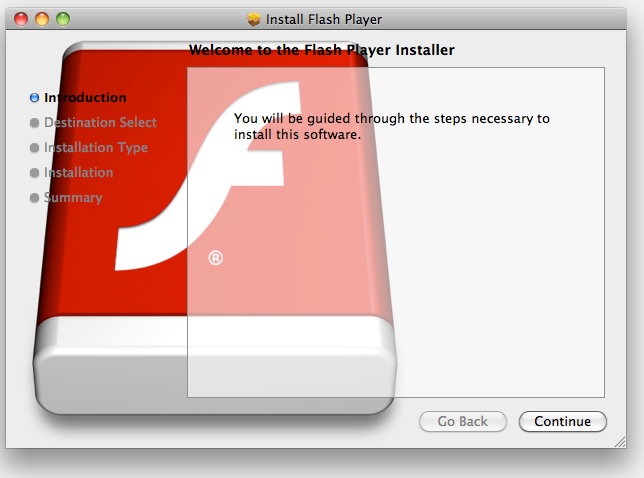
Mac malware is still quite rare, but there is one new threat floating around that you should be aware of. A new Trojan for Mac OS X disquises itself as an installer for the Adobe Flash Player browser plug-in, according to security software company Intego. The good news (if you want to call it that)? This new malware doesn't appear to have spread very far as of yet.

According to Intego, this Trojan spreads via malicious sites that feature links asking you to download Flash Player (recent versions of Mac OS X don't come with Flash Player pre-installed). Instead of being taken to the Adobe Flash site when clicking the link, you'll inadvertantly download the Trojan instead. The Trojan looks and acts like any typical Mac installer package--in fact, if you have the "Open 'safe' files after downloading" box checked in Safari, the installer will open automatically.

Intego is still trying to learn more about this particur Trojan, but the company says that "the installer for this Trojan horse will deactivate some network security software, and, after installation, will delete the installation package itself." From there, the Trojan "installs a dyld (dynamic loader) library and auto-launch code, allowing it to inject code into applications the user launches." Put in English, it basically turns good apps bad by making them run malicious tasks.

The malware then gathers information about your Mac, including its MAC address, and sends it to a server, which, according to Intego, "will allow the malware to detect if a Mac is infected."

But there's no need to panic: Intego says they've received only one report of this malware in the wild, so as of right now, this particular Trojan doesn't appear to have spread very far.

To keep it from spreading further, and to keep from becoming its next victim, there are a couple steps you can take. First, only download and install the version of Flash available directly from Adobe. Not only does it ensure that you'll get the real thing, but it ensures that you'll get the latest version, complete with the newest security fixes.

Also, if you use Safari, select Preferences from the Safari menu, click General, then un-check the box labeled "Open 'safe' files after downloading". This will prevent installers and other files (images, text documents, etc...) from opening automatically when you download them. In addition, don't open any downloads that you weren't expecting--this will prevent you from being taken advantage of by so-called drive-by downloads and other threats.

nb : pcworld
Read More...

24/09/11

New Mac malware poses as PDF doc

The Trojan code is crude and can't yet connect to control server, say security firms

Security firms today warned Mac users of a new Trojan horse that masquerades as a PDF document.

The malware, which was spotted by U.K.-based Sophos and Finnish antivirus vendor F-Secure, uses a technique long practiced by Windows attackers.

[ Discover the key Mac, iOS, and Apple tech trends for business users. Read InfoWorld's Technology: Apple newsletter. ]

"This malware may be attempting to copy the technique implemented by Windows malware, which opens a PDF file containing a '.pdf.exe' extension and an accompanying PDF icon," said F-Secure today.

That practice relies on what is called the "double extension" trick: adding the characters ".pdf" to the filename to disguise an executable file.

The Mac malware uses a two-step process, composed of a Trojan "dropper" utility that downloads a second element, a Trojan "backdoor" that then connects to a remote server controlled by the attacker, using that communications channel to send information gleaned from the infected Mac and receiving additional instructions from the hacker.

Because it doesn't exploit a vulnerability in Mac OS X -- or any other software -- the malware instead must dupe users into downloading and opening the seemingly-innocuous PDF document, which is actually an executable.

Once run, the dropper downloads the second-stage backdoor and opens a Chinese-language PDF. F-Secure said that the PDF was another sleight-of-hand trick: "[The dropper component] drops a PDF file in the /tmp folder, then opens it to distract the user from noticing any other activity occurring," the company said in a description of the attack.

Both Sophos and F-Secure noted that the malware doesn't work reliably, and currently can't connect to the C&C (command-and-control) server because the latter isn't fully functional.

Mac malware is typically crude in comparison with what targets Windows PCs.
Because the C&C server is not yet operational and since it found samples of the Trojans on VirusTotal -- a free service that runs malware against a host of antivirus engines -- F-Secure speculated that the malware is still in the testing phase.

Although Apple's Mac OS X includes a bare-bones antivirus detector, it has not been updated to detect the just-noticed Trojan dropper or backdoor. Checks of several Computerworld Macs running Lion, for instance, found that Apple last updated its detector on Aug. 9.

Mac users had their biggest malware scare earlier this year, when a series of fake security programs, dubbed "scareware," were aimed at them.

Several antivirus companies, including Sophos, F-Secure and Intego, offer security software for the Mac.

nb : infoworld Read More...

23/09/11

Researchers find Mac OS X malware posing as PDF file

Summary: The malware installs a backdoor that contacts a remote server for instructions and can be used to steal files or capture a screenshot of the infected computer system.


Researchers at F-Secure have discovered a Mac OS X malware file masquerading as a PDF file to lure users into installing a backdoor trojan.

The malware, flagged as a trojan dropper, installs downloader component that downloads a backdoor program onto the system, while camouflaging its activity by opening a PDF file to distract the user.

According to F-Secure, the PDF file contains Chinese-language text related to political issues, which some users may find offensive.

The use of a PDF file as a social engineering gimmick is widely used by malicious hackers on the Windows platform and F-Secure’s research team believes this is an attempt to copy the trick of opening a PDF file containing a “.pdf.exe” extension and an accompanying PDF icon.
 
“”The sample on our hand does not have an extension or an icon yet. However, there is another possibility. It is slightly different in Mac, where the icon is stored in a separate fork that is not readily visible in the OS. The extension and icon could have been lost when the sample was submitted to us. If this is the case, this malware might be even stealthier than in Windows because the sample can use any extension it desires,” the company said.


Once installed, the trojan dropper installs a backdoor program that gives a hacker full control of the infected Mac OS X machine.

The backdoor typically contacts a remote server for instructions and can be used to steal files or capture a screenshot of the infected computer system, which is then forwarded to the remote server.

F-Secure reports that the command-and-control of the malware is just a bare Apache installation that is not yet capable of communicating with the backdoor.

nb : zdnet
Read More...

Mac OS X Trojan hides behind malicious PDF disguise

Mac OS X malwareA fascinating new example of Mac malware has been discovered, that appears to be adopting an old Windows-style disguise to fool users into running it.

Despite the numerous times that cybercriminals have created boobytrapped PDF files that exploit vulnerabilities to infect unsuspecting users, many people still think that PDF files are somehow magically safer to open than conventional programs.

The OSX/Revir-B Trojan plays on this by posing as a PDF file.

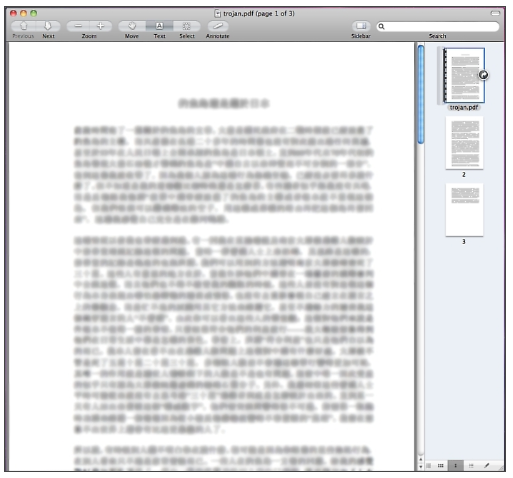
When the malicious Macintosh application file is run it tries to drop a PDF embedded inside it onto the user's hard drive. The Chinese language PDF file displayed is about a controversial topic, "Do the Diaoyu Islands belong to Japan?"

The Diaoyu Islands (known as the Senkaku islands in Japan) are the subject of a long-running dispute between the two countries, with both claiming sovereignty.
Because the document is opened, users may believe that they have opened a harmless PDF rather than run a program.

Malicious PDF

When we tested the malware inside our labs, we couldn't manage to get it to execute as the author probably intended - however, strings embedded deep inside its code make it clear that it was written with malicious intent.

Malware code

The malware attempts to install a backdoor Trojan horse (detected by Sophos as OSX/Imuler-A) which would give malicious hackers remote access to your Apple Mac computer.

As our friends at F-Secure point out, we have seen plenty of Windows malware in the past which has pretended to be a PDF rather than an EXE - sometimes using techniques such as the double-extension trick (for instance, filename.PDF.EXE).

It's quite possible that this is evidence that Mac malware authors are attempting something similar, moving on from the fake anti-virus alerts that blighted many Mac users earlier this year.

Customers of Sophos, including users of Sophos's free anti-virus for Mac, are protected against the malware.

nb : nakedsecurity.sophos
Read More...

New Mac OS X Trojan Imuler Hides Inside Malicious PDF

Malware that targets Mac OS X isn't anywhere near catching up to Windows-based malware in terms of volume and variety, but it seems that OS X malware may be adopting some of the more successful tactics that Windows viruses have been using to trick users. Researchers have come across a sample of an OS X-based Trojan that disguises itself as a PDF file, a technique that's been in favor among Windows malware authors for several years now.

The new piece of malware hides inside a PDF file and delivers a backdoor that hides on the user's machine once the malicious file is opened. Once the user executes the malware, it puts the malicious PDF on the user's machine and then opens it as a way to hide the malicious activity that's going on in the background, according to an analysis by researchers at F-Secure. The Trojan then installs the backdoor, which is named Imuler.A, which attempts to communicate with a command-and-control server.

That server isn't capable of communicating with the malware, however, the researchers found, so the malware is on its own once it's installed on a victim's machine. What's not clear is exactly how the malware is spreading right now.

"This malware may be attempting to copy the technique implemented by Windows malware, which opens a PDF file containing a ".pdf.exe" extension and an accompanying PDF icon. The sample on our hand does not have an extension or an icon yet. However, there is another possibility. It is slightly different in Mac, where the icon is stored in a separate fork that is not readily visible in the OS. The extension and icon could have been lost when the sample was submitted to us. If this is the case, this malware might be even stealthier than in Windows because the sample can use any extension it desires," the analysis by F-Secure said.

Windows-based malware variants have been using the same sort of techniques for hiding themselves for a long time now. They often use common file extensions such as DOC, PDF, XLS and others to entice users into opening the malicious file. In some cases, the malware may not have the proper icon to go along with the fake file extension, as is the case with the Mac OS X Revir.A malware that F-Secure identified. It's a simple trick, but it's still quite effective and users have shown themselves to be willing to open these files, regardless of the potential consequences.

nb : threatpost Read More...

22/09/11

September Adobe Flash update patches critical vulnerabilities

Adobe Flash logoAdobe has just released an update (APSB11-26) to its ubiquitous Flash software, revving it to version 10.3.183.10 for Windows, Mac, Solaris and Linux, and to version 10.3.186.7 for Android.

Today's release fixes six vulnerabilities in Flash Player, one of which was being used in targeted attacks (CVE-2011-2444). This bug is a cross-site scripting flaw which could allow malicious web pages to take actions on behalf of the logged in user.

Adobe has rated this update as Critical. SophosLabs has assigned it a High rating.
SophosLabs has yet to see any samples in the wild, and notes that CVE-2011-2444 is not straightforward to exploit. Nevertheless, as Adobe reports, this vulnerability has been exploited, albeit only in targeted attacks so far.

Windows, Mac, Solaris and Linux users can download the latest Flash player from http://get.adobe.com/flashplayer.

Do watch out though. If adding the bloat of Flash to your browsing experience isn't enough for you, Adobe has decided to default to bundling it with the Google Toolbar or McAfee trialware for Windows users.

Adobe Flash Player download page

You can untick the box before downloading if you don't want these options.
Maybe that's why Apple won't support Flash on iDevices. No portable versions of Google Toolbar or McAfee?

Android users can download the latest Flash Player from the Android Marketplace and Google Chrome users were automatically updated on September 20, 2011 with protection against these flaws.

nb : nakedsecurity.sophos
Read More...

20/09/11

OS X Lion bugs let hackers view, change local user passwords

Mac shops running Lion should take preventive measures to protect their data


OS X Lion bugs let hackers view, change local user passwords
The latest version of OS X Lion allows any user to easily change the password of any local account, due to permissions oversights on Apple's part.

The news comes less than a month after another Lion vulnerability that let users bypass LDAP without a password gained notoriety.

Originally reported by Defence in Depth blogger Patrick Dunstan, the root of the newly discovered problem in Mac OS X 10.7 is tied to the user-specific shadow files used in modern OS X platforms. These files are essentially hash databases and contain, among other things, the user's encrypted passwords. Ideally, they should be accessible only via high-privilege accounts.
According to Dunstan, Apple dropped the ball in terms of how Lion handles privilege. "Whilst non-root users are unable to access the shadow files directly, Lion actually provides non-root users the ability to still view password hash data," Dunstan wrote. "This is accomplished by extracting the data straight from Directory Services."

Any user can accomplish this trick by simply invoking the directory services listing using the /Search/ path -- for example, $ dscl localhost -read /Search/Users/bob (where "bob" is the username). This causes Lion OS X to spew out the contents of Bob's shadow hash file, including data that can be used to crack Bob's password with a simple script, such as a Python script written by Dunstan.

Making matters worse, running such a script wouldn't necessarily be required to gain access to Bob's account. Using Directory Services, a user could change a logged-in user's password -- without requiring authentication -- using this command: $ dscl localhost -passwd /Search/Users/bob
Notably, the targeted user's account could just as easily include admin privileges.
In order to pull off this hack, the perpetrator would require local access, though an outsider using social engineering could dupe a user to surrender the information. Additionally, a malicious insider could use his or existing information and wreak havoc if an admin left a machine without first logging out. Further, the user would need to access Lion's Directory Services -- another feat that would not be overly difficult in an environment with relatively lackluster security.

MacFixIt blogger Topher Kessler offered advice on how organizations can avoid being subject to these vulnerabilities. They include disabling automatic log-ins in Mac OS X; enabling sleep and screensaver passwords; disabling guest accounts (as well as accounts not in use); and better managing user privileges, such as allowing no greater permissions than necessary.

nb : infoworld Read More...