[+] Wayc0de's Blog[+]

Tampilkan postingan dengan label iphone. Tampilkan semua postingan

12/11/11

Apple's iOS 5.0.1 is out - should you upgrade?

Apple's latest iOS update is out.

The new version bumps iOS5 up to 5.0.1, and is Apple's first OTA update.

OTA stands for "over-the-air", and means that you can download and apply the update directly from your iDevice.
You no longer need to download the entire firmware file to your computer - including yet another copy of everything which hasn't changed in iOS - and push it to your device.
(OTA updating isn't yet mandatory. If you prefer to keep full copies of each iOS firmware distro, you can still use the download-and-install-with-iTunes method.)

According to Apple, the highlights of the 5.0.1 update are that it:
* fixes bugs affecting battery life,
* adds Multitasking Gestures for the original iPad,
* resolves bugs with Documents in the Cloud, and
* improves voice recognition for Australian users using dictation.

Strewth! That last one's a bonzer boost for blokes and sheilas everywhere! Gives an Aussie something worth lifting a tinnie to after the Baggy Green got such a big hiding from the South Africans in the cricket!

Importantly, 5.0.1 also fixes a number of security flaws, including a remote code execution (RCE) vulnerability involving font handling, found by Erling Ellingsen of Facebook. RCE means that a cybercriminal might be able to trick your device into running software without asking you, even if you're just browsing the internet.

Interestingly, Charlie Miller's recent and controversial App Store hole has also been patched. Miller showed how to write an innocent-looking App which, once approved by Apple, could fetch and run unapproved software.

Miller was unceremoniously banned from the Apple Developer scene for at least a year; there's no word from Apple, however, on whether he'll be readmitted now the hole is fixed.

Jailbreakers will be pleased to note that devices suitable for running a jailbroken iOS5 - a list which sadly still excludes the iPhone 4GS and the iPad 2 - can happily run a jailbroken iOS5.0.1.

If you are a jailbreaker, however, note that there is not yet any way to go back to iOS5.0 once you've moved on to 5.0.1.
That means that you'll never be able to use Charlie Miller's code-signing vulnerability for jailbreaking purposes in the future, for example if an iPad 2 jailbreak appears which relies on it.

And that leaves us with one question: should you update?
Some reports suggest that 5.0.1 brings with it a raft of new problems, and that the update might not, after all, fix your battery issues.

But these complaints are still anecdotal and unscientific, so if you trust Apple and you're not into jailbreaking, I'd suggest updating to 5.0.1 as soon as you conveniently can.

Ellingsen's and Miller's vulnerabilities may not have made it to Apple's highlights list, but each of these bugs on its own can be considered sufficiently important to warrant a prompt update.
Read More...

06/11/11

Apple Security Chief Reportedly Leaves Company

Apple’s vice president of global security has reportedly stepped down roughly two months after the surface of news reports that an iPhone prototype had gone missing for the second time in less than two years.

According to reports, John Theriault, who came to Apple from Pfizer and was a former FBI agent, has retired in the wake of controversy regarding the device's disappearance and the subsequent efforts to track it down. Apple did not return a request for comment.

Nevertheless, Theriault’s departure follows a public relations dustup that began when an Apple employee left the prototype at a bar in San Francisco. The company's attempts to find the device led it to 22-year-old Sergio Calderon, who has said members of Apple's security team showed up at his home in San Francisco with police to search for the phone. According to Calderon, he only let the Apple investigators in because he thought they were police. However, the San Francisco Police Department - which initially denied involvement - has said that while there were officers at the scene, the search itself was conducted by the Apple employees.

The device, believed to have been a prototype of an iPhone 4S, was not found during the search. A lawyer for Calderon has reportedly threatened a lawsuit against Apple.

The latest case of the missing prototype echoes the disappearance of an iPhone 4 prototype in 2010. In that incident, an Apple employee left the phone at a bar called Gourmet Haus Staudt in Redwood City, Calif. When the phone was discovered, it was sold to the tech blog Gizmodo, which dissected the device and published pictures. This ultimately led investigators to raid the home of a Gizmodo editor. Two men were charged with selling the phone to Gizmodo and were sentenced to probation earlier this year. No one from Gizmodo was charged.

In the aftermath of the most recent incident, Apple was found to have posted job listings for a “product security manager” who would be responsible for “overseeing the protection of, and managing risks to, Apple’s unreleased products and related intellectual property.”
Read More...

19/10/11

Pentesting Iphone Applications


Description: This presentation mainly focuses on methodology, techniques and the tools that will help security testers while assessing the security of iPhone applications.
Read More...

18/10/11

NoScript security tool released for Android, Maemo

The mobile version of the Firefox extension includes protection for cross-site scripting attacks and clickjacking

The developer of the widely used Firefox extension NoScript has released a version for the Android and Maemo operating systems.

NoScript is a security tool that can be used to block the execution of JavaScript, Java, Flash, and plugins by websites that are viewed as being potentially malicious. Many Web-based attacks on computers are initiated by JavaScript.

[ Learn how to manage iPads, iPhones, Androids, BlackBerrys, and other mobile devices in InfoWorld's 20-page Mobile Management Deep Dive PDF special report. | Keep up on key mobile developments and insights via Twitter and with the Mobile Edge blog and Mobilize newsletter.

NoScript's developer, Giorgio Maone, wrote on his blog on Saturday that porting the application for Firefox on Android and Maemo was not easy, as it was a full rewrite of the extension, and "there's still a lot of work ahead."

The mobile version, called NoScript 3.0a8, includes protection against cross-site scripting attacks, in which a script drawn from another website is allowed to run that shouldn't. Cross-site scripting can allow an attacker to steal information or potentially cause other malicious code to run.

It also can block "clickjacking," another kind of attack where a user is tricked into clicking on certain parts of a Web page with hidden buttons that perform malicious actions. Those hidden buttons are delivered by an invisible iframe, which is a window that brings other content into the target website.

In 2008, researchers Robert Hansen and Jeremiah Grossman discovered a clickjacking attack involving Adobe Systems' Flash application that could give remote access to a victim's Web camera and microphone.

There are around 1,000 pieces of malware circulating for mobile devices, which pales in comparison to malware built for Windows desktop operating systems. But security analysts predict that mobile phones will increasingly be attacked for the sensitive data stored on the devices.

The NoScript mobile version shares many of the same functions as the desktop one. For example, users can built an "easy blacklist," where they select untrusted sites on which JavaScript and plugins should be blocked. Another option is the "classic whitelist," where sites that are trusted are added to a list that NoScript doesn't block.

Maone wrote that NoScript does not require the browser to be restarted after updates are installed, which "means that hot fixes for new security threats can be deployed in a more effective, timely, and convenient way."
Read More...

14/10/11

ATM Skimmer Powered by MP3 Player

Almost a year ago, I wrote about ATM skimmers made of parts from old MP3 players. Since then, I’ve noticed quite a few more ads for these MP3-powered skimmers in the criminal underground, perhaps because audio skimmers allow fraudsters to sell lucrative service contracts along with their theft devices.

Using audio to capture credit and debit card data is not a new technique, but it is becoming vogue: Square, an increasingly popular credit card reader built for the iPhone, works by plugging into the headphone jack on the iPhone and converting credit card data stored on the card into audio files.

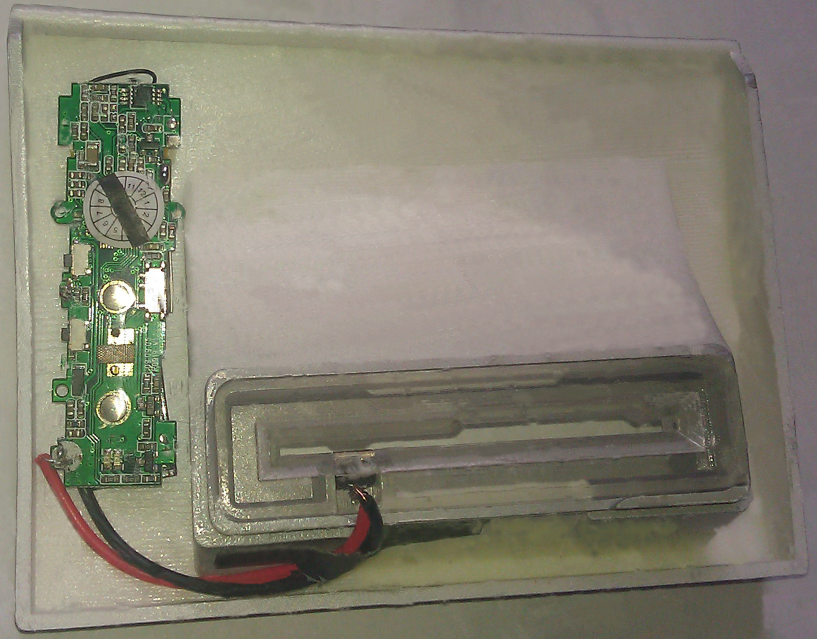
An audio skimmer for a Diebold ATM.

The device pictured here is a card skimmer designed to fit over the card acceptance slot on a Diebold Opteva 760, one of the most common ATMs around. The green circuit board on the left was taken from an MP3 player (no idea which make or model). When a card is slid past the magnetic reader (the small black rectangle at the end of the black and red wires near the center of the picture), the MP3 player “hears” the data stored on the card’s magnetic stripe, and records it as an audio file to a tiny embedded flash memory device.


The card skimmer comes with a false panel that fits snugly into the top of the ATM; it contains a miniature video camera that records victims entering their PIN when the card skimmer slot is activated. The battery included in the hidden camera lasts for six hours, according to the ad posted by the skimmer’s designer. The entire package costs $1,500, payable via virtual currencies such as WebMoney and Liberty Reserve.

The vendor of this skimmer kit advertises “full support after purchase,” and “easy installation (10-15 seconds).” But the catch with this skimmer is that the price tag is misleading. That’s because the audio files recorded by the device are encrypted. The Mp3 files are useless unless you also purchase the skimmer maker’s decryption service, which decodes the audio files into a digital format that can be encoded onto counterfeit ATM cards.

In fairness, the seller does note in the fine print that third party software is required to decrypt the audio files, and that he is “working closely with another partner for this service.” That partner is a different fraudster who will decrypt the audio files in exchange for 20 percent of the stolen card numbers and PINs. Read More...

Error 3200: Apple iOS 5 stumbles on launch

Apple has launched the much anticipated iOS 5.0 - the new version of its operating system for iPhones and iPads, complete with revolutionary new features such as the iCloud.

It should have been a great moment for the company, and something to put some cheer back in Apple fans' hearts following the death of founder Steve Jobs last week.

iOS 5

However, things aren't going as smoothly and catch-free as the notoriously detailed-orientated company would perhaps like.

Error 3200 trending on TwitterMany users are finding that their attempts to update their iOS devices to the latest and greatest version of the mobile operating system are floundering, with users faced with error messages such as

"An internal error occurred." (3200)
during the install process.
Others are seeing messages related to internal errors 3002 or Error 3004.

Whatever the number, the problem has got so big that the phrase "Error 3200" is currently trending on Twitter.

Theories are bouncing around the net that Apple is simply a victim of its own success, and its servers have not been able to cope with demand for the new version of iOS, meaning that devices are failing to properly register themselves with the mothership. If that's true, you might be wise to wait a day or two.

Error message

Unfortunately, Apple's website isn't being terribly helpful for any users searching for information about what the error may mean:

No results found

Come on Apple, surely you can do better than that?
Me? I have chosen to hold off upgrading my wife's iPhone and iPad to iOS 5.0 - just as we haven't updated our iMac at home to Mac OS X Lion yet.

Call me antediluvian if you wish, but I can't really see the attraction in being an early-adopter. Security patches are one thing, but if something is working for me just fine, I don't feel the need to install the shiny new version as soon as it rolls off the software vendor's conveyor belt.

The risk is always going to be that there are still some wrinkles to iron out. I'd much rather wait until the teething problems have been sorted out, and then consider whether the new features built into Apple's operating system are what I'm after.

This is hardly the most auspicious launch for iOS 5.0 and the much vaunted iCloud. And let's not forget, if there's an error 3200 you have to assume that there's at least another 3199 error messages waiting to show their face to some poor users at some point in the future. :) Read More...

06/10/11

Steve Jobs death exploited by Facebook scammers

It's impossible to express how sad many people in the technology world feel at the news of the death of Steve Jobs.

Sickeningly, as with the deaths of other figures in the public eye, there are scammers waiting to take advantage of bad news.

Here's a scam we have seen on Facebook, claiming that free iPads are being given away "in memory of Steve Jobs".


In memory of Steve, a company is giving out 50 ipads tonight. R.I.P. Steve Jobs [LINK]

The cool-sounding link sucks you in, tricking you into believing that you may get a free iPad but then goes on to get you to complete online surveys to "qualify".

The link goes through the bit.ly short url service (we have asked our friends at bit.ly to shut the link down) and we can see that over 15,000 people have already clicked on the link which was set up within hours of Steve Jobs's death first being announced.


Of course, if you were one of those people who clicked on the link you may be wondering what the chances are that you will receive a free iPad. I hate to disappoint you, but it's pretty unlikely.

The webpage you are taken to is very similar to ones we have seen pointed to by other scammers. Here's what I saw:


I am writing this article from the Virus Bulletin conference in Barcelona, and you can see that the page has automagically determined where I am in the world and adjusted its language and wording as appropriate.

Below you'll see how the survey pages look if you visit them from Sydney, Australia, for instance.

Survey site visited from Australia
If you don't click through within a few seconds, it plays an audio message urging you to do so:

You'll notice that the audio message spectacularly fails to mention the 50 free iPads, which have by this time been reduced to the promise of "an exclusive reward", whatever that might be.

My colleague Paul Ducklin captured the audio and - being a fountain of interesting but not always entirely relevant information - tells me that the speaker is an Australian who grew up in South Africa.

When Duck visited the page a second time from Sydney, this is what he saw:
Casino website
How do the scammers make money? Well, they are earning affiliate cash - in a nutshell, they make more money the more traffic they can direct to websites, driving more people to become customers, or take online surveys and competitions.

Cynically, they exploited the death of Steve Jobs in the hope of driving large numbers of internet users to websites offering content such as contests, surveys and online gambling. The fact is, of course, that they could just as easily have taken those users to a webpage containing malicious code or a phishing page designed to steal credentials.

Chances are that this won't be the only scam we see regarding the untimely death of Steve Jobs. It wouldn't be a surprise, for instance, to see scams which might try to take advantage of those moved by the loss of Apple's founder with lures like "Donate to Steve's favourite charities as a tribute".

If you do want to pay tribute to Steve Jobs, the most appropriate place it seems to me would be Apple's website itself.

The truth is that the scammers are not geniuses like Jobs, and they don't contribute anything to the world of technology or wider society as Steve Jobs did. It's a shame that they can't be inspired by speeches like the one Jobs gave at Stanford University in 2005, and make something better of their lives.


I think that's how we should remember Steve Jobs today.

Please folks - always think carefully about the links that you click on. Time and time again scammers and cybercriminals have proven themselves to have no qualms about exploiting news stories - whether it be the personal tragedy of a teenage girl committing suicide, bizarre escapades, a natural disaster or the latest salacious celebrity gossip.


Read More...

02/10/11

The next frontier in fearing the iPad

Some in IT keep looking for another reason to say no to the world of consumerized IT; mobile DLP is their latest attempt to regain control

In 2010, scaredy-cat IT and security folks wrung their hands over users bringing in their own smartphones and tablets. In early 2011, they wrung their hands over how to control the applications on those devices. Now they're wringing their hands over data leakage from those devices, prompting security vendors to offer mobile DLP (data loss prevention) tools. Zenprise is the first, but you can bet more will follow. (Have you heard of any iPad- or iPhone-related data breaches? I didn't think so.)

I have to give these folks credit: They're persistent in finding ways to say no to modern technology and the realities of today's "consumerized IT," or at least to look for new ways to bind it up in hopes maybe it'll strangle to death. (Good luck with that.) Of course, it's the iPad that seems to stoke these folks' fears the most -- ironically, because it can connect to business systems and actually work with much business data, so people want and use it.

[ Apple has much to learn about securing Mac OS X -- and Microsoft could teach it how. Luckily, iOS security is much, much better. | Compare the security and management capabilities of iOS, Android, WebOS, Windows Phone 7, and more in InfoWorld's Mobile Management Deep Dive PDF report. ]

Mobile Management Deep Dive
Let's be clear: There is data to protect, and I don't believe "anything goes" is the the right policy. And there is some technology worth considering to do so, as I describe later. But I see another agenda behind much of these claims over security concerns. I notice, for example, that companies citing fears over sensitive data emailed to an iPad or of users having unapproved apps on an Android tablet don't have the same concern over data emailed to computers or over the fact that they happily let employees work after hours from home computers full of personal apps. There's a double standard that reeks of a hidden agenda to block the shift to employee-driven technology or to assert new levels of self-justified control in a perverse land grab for relevance or job security.

A good test of whether a security policy is legitimate is if it is applied equally to all endpoints. These days, many endpoints are in use, and we will not go back to the day of employees all working at a corporate office on corporate PCs unconnected to the Internet and locked out from the rest of the world. It's 2011, not 1981. A second good test is whether its cost (in money, lost flexibility, lost opportunity, and time) is worth whatever is being secured.

The fact is, the iPad and all the other mobile devices that have enjoyed so much uptake by individuals and enlightened businesses bring tremendous benefit. More work can be done in more places, improving customer satisfaction and the company's bottom line. Employees can use the tools and devices that fit their personal style, reflecting and honoring what they bring to the table -- they are not robots, after all. And they can use a mix of personal and business tools, which helps the business because now they work more and across additional hours of the day. Additionally, this compensates the employee by letting them reclaim some of that time for their personal lives.


Proposing one problem, but addressing another

Back to this third wave of fear over data on iPads: This week, Zenprise announced an iPad app and related server software that lets iPad users access SharePoint files on their tablets, with the permissions and restrictions honored on the iPad. That's great -- Microsoft's approach to SharePoint has been to restrict it to Windows PCs and Windows Phone 7 smartphones, which only encourages employees to copy the files to cloud storage, email them, and otherwise work outside of SharePoint when they're using an iPad, Android tablet, Mac, or a home PC. This tool addresses some of the security risk created by Microsoft's lock-in strategy for SharePoint. (Zenprise plans a version for Android next year. It started with iPads because they are so widely used in business.)

But Zenprise's pitch didn't start so constructively. It first took the fearmongering route, using an example of the increasingly common practice of boards of directors using iPads to work with the sensitive documents in board meetings rather than going with paper copies. In this regard, corporate boards aren't alone: I learned during a work trip earlier this year that several counties in Florida now give their boards of supervisors iPads to review legislative and regulatory proposals, as they are easier to set up and use than computers.

The Zenprise pitch was that a DLP tool would keep such sensitive documents secure -- except it wouldn't. If the data were emailed, as I was informed, once the data left the organization to its legitimate, DLP-approved recipients, those files could be abused as desired on an iPad, a computer, or any other device with email access. Plus, in Zenprise's case, its DLP is limited to files accessed directly from SharePoint, so it wouldn't address an emailed document. For any documents accessed directly from SharePoint that the user had permission to edit locally, that local copy is not managed by SharePoint or the Zenprise app (it's now in another app, for editing), so it's now free for abuse. The tool does not address the example problem.

The other scary scenario in the pitch was the notion that IT set the data security policies. That's a mistake. Document access policies are a legal and business decision, not one that IT should make. IT should provide the tools to implement the policies and to monitor their compliance, but if IT has to decide what to protect -- or even if someone has to go to IT to protect a document, rather than do it directly -- something is seriously wrong with your technology management.

I don't mean to pick on Zenprise. The folks there try to balance the demands of their customers (for a security vendor, that means the most paranoid ones) with the realities of the users who ultimately deploy their customers' tools. But when a nuanced vendor like Zenprise goes down the fearmongering path, you can only imagine what the more old-school firms will say when they decide to join in.

A better approach to securing corporate data on the iPad

What's changed in business in the last decade (it started with working at home, not with iPads) is that information has to flow to be useful, because different people who may not even be in your organization need to create, refine, and act on it. That means it goes through multiple endpoints and a variety of tools. The old-fashioned approach was to standardize everything on a common platform and toolset, with the common security layer across it all -- the classic model for IT control. But that doesn't work when the world is heterogeneous and by definition not standardized. That's what it is today in most places, and traditional IT control doesn't fit that new world.

Within a SharePoint context, letting iPad users participate within the same rules as Windows users is a good thing. But at the end of the day, it's a partial solution attacking the wrong problem. And let's be honest, Zenprise is not offering a DLP tool but a mobile SharePoint client. That's a good thing for many companies in the here and now that use SharePoint, but it only works in the SharePoint context. If anything, the "consumerization of IT" phenomenon should teach IT that point solutions are insufficient in a heterogeneous context.

So, if you were to use the Zenprise SharePoint client, you couldn't stop there. You might also want to deploy a remote access tool that has the iPad user work with the data virtually so that sensitive information never leaves the managed server -- not just SharePoint servers -- in the first place. That approach of course requires expensive, management-heavy, and bandwidth-intensive desktop virtualization.

Of course, there's a simpler twist on that approach: Using services like Accellion and Box.net that let you set up access-managed shared folders, where documents are restricted to a managed workspace on the mobile device. The problem with these services is that they restrict the users to basic reading and commenting; an employee who wants to work on a proposal or presentation is either prevented from doing so or moves the files to another app, breaking the management control over that file. But that could change: both companies, as well as GoodReader and six others are looking to implement MobileIron's content management API in their apps; not yet in beta, this technology would let IT set policies for content via an MDM tool that the apps would enforce.

A better approach for many companies than all of these would be to extend traditional DLP to mobile devices. DLP works by funneling data traffic to a server that analyzes the content and applies its rules to it (usually just flagging suspect transmissions, but sometimes acting on them, such as to block the transmission).

That way, you're handling all apps and communications, regardless of the
endpoint device, through a universal filter at the data center, where this effort should happen anyhow. In fact, the endpoint device isn't involved, so you don't need to worry about if an app or OS gives you the visibility you need; all you need to do at the endpoint is ensure that its communication is routed through the DLP server. I suspect we'll see DLP tools get extended just that way to handle the new generation of mobile devices -- I sure hope so.

But over the longer term, DLP itself suffers from being an island. It can handle data sent over communications channels, but there are other means to get data from devices, such as local file copying. Ultimately, what we need is digital rights management that works across apps and platforms -- a universal standard that carries the DLP rules with the data itself. Until it exists (if it ever does, considering how proprietary the tech industry has become again, though MobileIron's effort could be a jumpstart), IT is stuck with old approaches that don't fit the new world in which IT still has to provide security.

No easy answers for legitimate IT security needs

Even IT and security leaders who aren't looking to enrich security vendors by asking for more tools that won't really work have a problem: How to secure all the data (and just the data) that needs to be protected while supporting the shift to employee-provided technology and its accompanying flexibility. However, there's no good answer -- yet.

Flexibility and control are a hard combination to get. But users will accept that goal and work with you on it. Remember, not all problems are solved with technology; people are good tools, too. You can start by not trying to recapture mainframe-era IT control, but instead figuring out what data really needs to be protected. From there, you can manage, monitor, and log access to the data so that it's available to those you trust. If it leaks, you might also know who's broken that trust.

If you try to use security to block the flexibility that consumerized IT is really all about, you'll drive your users underground (which increases your security risk), waste lots of money on tools that don't work as you want, and get in the way of your business's ability to work well, setting a path to failure and, ultimately, oblivion. Read More...

29/09/11

Zenprise offers iPad app for secure SharePoint access

Positioned as a data loss prevention tool, the app and server software focus on enforcing SharePoint content policies on iOS devices

Zenprise on Wednesday announced that the new version of its MobileManager mobile device management (MDM) suite will include a component that lets iPad and iPhone users access Microsoft SharePoint project files and transfer them from their iOS device into a secure container. The module will honor the access policies set in SharePoint, both the on-premise and Office 365 versions; thus, files can be set as read-only or uncopyable via email or transfer to other iOS apps. An Android version is planned for early 2012.

The company calls this module a data loss prevention (DLP) capability. However, unlike traditional DLP tools, it does not scan outgoing information from the corporate network to see if the sender and recipient have permission to access that data. Instead, it extends the existing SharePoint controls to iOS.

[ Stay ahead of the key tech business news with InfoWorld's Today's Headlines: First Look newsletter. | Read Bill Snyder's Tech's Bottom Line blog for what the key business trends mean to you. ]

Microsoft does not support iOS or other mobile operating systems except its own Windows Phone, causing many SharePoint users working on mobile devices to copy project files outside the SharePoint environment so that they can be used when traveling. Zenprise spokesman Ahmed Datoo says the DLP module is meant to address that gap in SharePoint's reach outside Microsoft enviroments.

Zenprise expects the updated MobileManager product to be available by December; pricing has not been set.


Read More...
