![[+]d'ZheNwaY's Blog[+]](http://feeds.feedburner.com/blogspot/YRtWp.1.gif)

The mobile version of the Firefox extension includes protection for cross-site scripting attacks and clickjacking
The developer of the widely used Firefox extension NoScript has released a version for the Android and Maemo operating systems.
NoScript is a security tool that can be used to block the execution of JavaScript, Java, Flash, and plugins by websites that are viewed as being potentially malicious. Many Web-based attacks on computers are initiated by JavaScript.
[ Learn how to manage iPads, iPhones, Androids, BlackBerrys, and other mobile devices in InfoWorld's 20-page Mobile Management Deep Dive PDF special report. | Keep up on key mobile developments and insights via Twitter and with the Mobile Edge blog and Mobilize newsletter.
NoScript's developer, Giorgio Maone, wrote on his blog on Saturday that porting the application for Firefox on Android and Maemo was not easy, as it was a full rewrite of the extension, and "there's still a lot of work ahead."
The mobile version, called NoScript 3.0a8, includes protection against cross-site scripting attacks, in which a script drawn from another website is allowed to run that shouldn't. Cross-site scripting can allow an attacker to steal information or potentially cause other malicious code to run.
It also can block "clickjacking," another kind of attack where a user is tricked into clicking on certain parts of a Web page with hidden buttons that perform malicious actions. Those hidden buttons are delivered by an invisible iframe, which is a window that brings other content into the target website.
In 2008, researchers Robert Hansen and Jeremiah Grossman discovered a clickjacking attack involving Adobe Systems' Flash application that could give remote access to a victim's Web camera and microphone.
There are around 1,000 pieces of malware circulating for mobile devices, which pales in comparison to malware built for Windows desktop operating systems. But security analysts predict that mobile phones will increasingly be attacked for the sensitive data stored on the devices.
The NoScript mobile version shares many of the same functions as the desktop one. For example, users can built an "easy blacklist," where they select untrusted sites on which JavaScript and plugins should be blocked. Another option is the "classic whitelist," where sites that are trusted are added to a list that NoScript doesn't block.
Maone wrote that NoScript does not require the browser to be restarted after updates are installed, which "means that hot fixes for new security threats can be deployed in a more effective, timely, and convenient way."
Read More...
18/10/11
NoScript security tool released for Android, Maemo


14/10/11
Error 3200: Apple iOS 5 stumbles on launch
Apple has launched the much anticipated iOS 5.0 - the new version of its operating system for iPhones and iPads, complete with revolutionary new features such as the iCloud.
It should have been a great moment for the company, and something to put some cheer back in Apple fans' hearts following the death of founder Steve Jobs last week.

However, things aren't going as smoothly and catch-free as the notoriously detailed-orientated company would perhaps like.
 Many users are finding that their attempts to update their iOS devices to the latest and greatest version of the mobile operating system are floundering, with users faced with error messages such as
"An internal error occurred." (3200)during the install process.
Others are seeing messages related to internal errors 3002 or Error 3004.
Whatever the number, the problem has got so big that the phrase "Error 3200" is currently trending on Twitter.
Theories are bouncing around the net that Apple is simply a victim of its own success, and its servers have not been able to cope with demand for the new version of iOS, meaning that devices are failing to properly register themselves with the mothership. If that's true, you might be wise to wait a day or two.

Unfortunately, Apple's website isn't being terribly helpful for any users searching for information about what the error may mean:

Come on Apple, surely you can do better than that?
Me? I have chosen to hold off upgrading my wife's iPhone and iPad to iOS 5.0 - just as we haven't updated our iMac at home to Mac OS X Lion yet.
Call me antediluvian if you wish, but I can't really see the attraction in being an early-adopter. Security patches are one thing, but if something is working for me just fine, I don't feel the need to install the shiny new version as soon as it rolls off the software vendor's conveyor belt.
The risk is always going to be that there are still some wrinkles to iron out. I'd much rather wait until the teething problems have been sorted out, and then consider whether the new features built into Apple's operating system are what I'm after.
This is hardly the most auspicious launch for iOS 5.0 and the much vaunted iCloud. And let's not forget, if there's an error 3200 you have to assume that there's at least another 3199 error messages waiting to show their face to some poor users at some point in the future. :) Read More...
12/10/11
Internet Explorer 9 haunted by 'critical' security vulnerabilities
Summary: Microsoft fixes drive-by download flaws in the latest version of its dominant Internet Explorer browser and warns that exploits could emerge within 30 days.
Microsoft’s shiny new Internet Explorer 9 browser contains critical security vulnerabilities that expose users to drive-by download attacks, the company warned today.
The IE warning highlights this month’s batch of security patches from Microsoft where the company shipped eight security bulletins (two critical, six important) to cover gaping holes in Internet Explorer, .NET Framework & Silverlight, Microsoft Windows, Microsoft Forefront UAG and Microsoft Host Integration Server.follow Ryan Naraine on twitter
According to Microsoft, the IE vulnerabilities could be exploited if a user simply surfs to a maliciously rigged website.
The IE update (MS11-081), available for all users or Microsoft Windows and all versions of Internet Explorer, covers at least eight documented security holes in the world’s most widely used browser. The most severe vulnerabilities could allow remote code execution if a user views a specially crafted Web page using Internet Explorer. An attacker who successfully exploited any of these vulnerabilities could gain the same user rights as the local user. Users whose accounts are configured to have fewer user rights on the system could be less impacted than users who operate with administrative user rights.
The update fixes the vulnerabilities by modifying the way that Internet Explorer handles objects in memory and the way that Internet Explorer allocates and accesses memory, Microsoft explained.
Microsoft is urging all Windows users to treat this with the utmost priority because of the likelihood of reliable exploit code within 30 days. Malicious hackers typically reverse-engineer the patches to identify the flaws and write exploits immediately to launch malware attacks.
The second “critical” update (MS11-078) addresses a vulnerability in .NET Framework and Microsoft Silverlight that could expose users to remote code execution attacks.
The vulnerability could allow remote code execution on a client system if a user views a specially crafted Web page using a Web browser that can run XAML Browser Applications (XBAPs) or Silverlight applications. Users whose accounts are configured to have fewer user rights on the system could be less impacted than users who operate with administrative user rights. The vulnerability could also allow remote code execution on a server system running IIS, if that server allows processing ASP.NET pages and an attacker succeeds in uploading a specially crafted ASP.NET page to that server and then executes the page, as could be the case in a Web hosting scenario. This vulnerability could also be used by Windows .NET applications to bypass Code Access Security (CAS) restrictions.
Microsoft warns that a victim could be exploited if he/she browses to a malicious webpage with aSilverlight-enabled browser.
As with the IE patch, Microsoft exploits to see “reliable exploits” for Silverlight 3 over the next 30 days.
The company also raised an alert for a third bulletin (MS11-077) that covers at least four documented vulnerabilities in Windows kernel-mode drivers (Win32k.sys).
The most severe of these vulnerabilities could allow remote code execution if a user opens a specially crafted font file (such as a .fon file) in a network share, a UNC or WebDAV location, or an e-mail attachment, the company explained.
The security update addresses the vulnerabilities by correcting the way that the Windows kernel-mode drivers validate input passed from user mode, handle the TrueType font type, allocate the proper buffer size before writing to memory, and manage kernel-mode driver objects.
This month’s Patch Tuesday batch also covers five privately reported vulnerabilities in Forefront Unified Access Gateway (UAG). The most severe of these vulnerabilities could allow remote code execution if a user visits an affected Web site using a specially crafted URL.
It also provides fixes for a solitary flaw in the Microsoft Windows Ancillary Function Driver (AFD) and two publicly disclosed vulnerabilities in Host Integration Server.
The Host Integration Server vulnerabilities could allow denial of service if a remote attacker sends specially crafted network packets to a Host Integration Server listening on UDP port 1478 or TCP ports 1477 and 1478.
Read More...
06/10/11
NSS Labs offers reward money for fresh exploits
The company has set aside $4,400 for rewards for working exploits for 12 vulnerabilities
NSS Labs is sweetening the pot for its ExploitHub marketplace by offering rewards to security gurus who can write working exploits for a dozen "high-value" vulnerabilities.The company, which has set aside $4,400 in reward money, plans to give $100 to $500 to the first people to submit a working exploit for the vulnerabilities. Ten of the vulnerabilities concern Microsoft's Internet Explorer browser, and two were found in Adobe's Flash multimedia program.
[ The Web browser is your portal to the world -- as well as the conduit that lets in many security threats. InfoWorld's expert contributors show you how to secure your Web browsers in this "Web Browser Security Deep Dive" PDF guide. ]
The exploits must be client-side remote exploits that can result in code execution. Proof-of-concept code and denial-of-service conditions do not qualify. NSS Labs will pay the developer with American Express gift cards. Residents from countries that the U.S. has a standing embargo against are not allowed to participate.
NSS Labs said that those who win can then sell their exploits on ExploitHub, a marketplace the company set up for penetration testers to acquire exploits to test against their infrastructure. ExploitHub was set up to help with the development of penetration testing tools and to assist computer security researchers.
Those who write the winning exploits may then sell their code on ExploitHub, with NSS Labs taking a 30 percent commission. Penetration testers can also make requests via the marketplace for exploits for specific vulnerabilities. Those who want to buy exploits are vetted by NSS Labs to ensure the marketplace is not abused.
ExploitHub also only sells exploits for vulnerabilities that have been patched and does not host ones for zero-day vulnerabilities. The vulnerabilities that NSS Labs is offering the reward for are:
- CVE-2011-1256: Microsoft Internet Explorer CElement Memory Corruption
- CVE-2011-1266: Microsoft Internet Explorer VML vgx.dll Use After Free
- CVE-2011-1261: Microsoft Internet Explorer selection.empty Use After Free
- CVE-2011-1262: Microsoft Internet Explorer Redirect Memory Corruption
- CVE-2011-1963: Microsoft Internet Explorer XSLT Memory Corruption
- CVE-2011-1964: Microsoft Internet Explorer Style Object Memory Corruption
- CVE-2011-0094: Microsoft Internet Explorer CSS Use After Free Memory Corruption
- CVE-2011-0038: Microsoft Internet Explorer 8 IESHIMS.DLL Insecure Library Loading
- CVE-2011-0035: Microsoft Internet Explorer Deleted Data Source Object Memory Corruption
- CVE-2010-3346: Microsoft Internet Explorer HTML Time Element Memory Corruption
- CVE-2011-2110: Adobe Flash Player ActionScript Function Variable Arguments Information
- CVE-2011-0628: Adobe Flash Player Remote Integer Overflow Code Execution
05/10/11
Google shells out $10,000 to fix 10 high-risk Chrome browser flaws
 Google has shipped another Chrome browser update with fixes for several “high-risk” security vulnerabilities that expose Windows, Mac OS X and Linux users to malicious hacker attacks.
The new Google Chrome version 14.0.835.202 also contains Adobe Flash Player 11, a software update that includes several security and privacy goodies.
As part of its bug bounty program, Google spent about $10,000 to buy the rights to the vulnerability information from security researchers.
Details on the vulnerabilities:
- [$1000] High CVE-2011-2876: Use-after-free in text line box handling. Credit to miaubiz.
- [$1000] High CVE-2011-2877: Stale font in SVG text handling. Credit to miaubiz.
- [$2000] High CVE-2011-2878: Inappropriate cross-origin access to the window prototype. Credit to Sergey Glazunov.
- [96150] High CVE-2011-2879: Lifetime and threading issues in audio node handling. Credit to Google Chrome Security Team (Inferno).
- [$4500] High CVE-2011-2880: Use-after-free in the v8 bindings. Credit to Sergey Glazunov.
- [$1500] High CVE-2011-2881: Memory corruption with v8 hidden objects. Credit to Sergey Glazunov.
- [98089] Critical CVE-2011-3873: Memory corruption in shader translator. Credit to Zhenyao Mo of the Chromium development community.
Mozilla advises Firefox users to disable McAfee plugin
McAfee ScriptScan could cause stability or security problems and is responsible for browser crashes, according to Mozilla
It's the last thing McAfee would want users to hear about one of its products, but the Firefox browser is advising users to disable McAfee's ScriptScan software, saying that it could cause "stability or security problems."SriptScan ships with McAfee's VirusScan antivirus program. It's designed to keep Web surfers safe by scanning for any malicious scripting code that might be running in the browser. But according to Mozilla it has an unintended side-effect: It can cause Firefox to crash... a lot.
[ Get your websites up to speed with HTML5 today using the techniques in InfoWorld's HTML5 Deep Dive PDF how-to report. | Learn how to secure your Web browsers in InfoWorld's "Web Browser Security Deep Dive" PDF guide. ]
In a note posted to its website, Mozilla said that the add-on "causes a high volume of crashes," and is "strongly encouraging" users to disable the software. The warning applies to all users of version 14.4.0 and below of the plugin, Mozilla said.
The Firefox browser started popping up warning messages Monday, advising that users disable the software
In McAfee user forums, there is a smattering of complaints about the Firefox problem.
The problem affects Firefox 7 users, according to Francie Coulter, a McAfee spokeswoman. "McAfee has identified the cause and is working actively with the Firefox team to resolve this issue and expects to roll out an update shortly," she said in an email message.
Read More...
02/10/11
Microsoft security update treats Chrome as malware
Redmond releases same-day correction, but not before Windows Security purges Chrome from user systems

Coincidentally (of course), the faux pas comes on the heels of news from StatCounter that Chrome is poised to overtake Firefox this year as the No. 2 most-popular browser in the world.
"Google Chrome has been incorrectly marked as malware by Microsoft security software. Please update your Microsoft security software to version 1.113.672.0, which resolves this issue," according to an alert over at the over at the Google Chrome forums.
Microsoft, meanwhile, posted a somewhat vague alert of its own, starting that it had released a security update today with "an incorrect detection for PWS:Win32/Zbot," a password-stealing Trojan that monitors for visits to certain websites. However, Microsoft neglected to specify in its update just what impact this "incorrect detection" had; the update doesn't even mention Chrome. Evidently, Microsoft would prefer to let Chrome users and Google deal with figuring why, exactly, Microsoft Security Center suddenly started deeming Chrome a security threat and purging it from users' systems.
To Microsoft's credit, it did issue a second update the same day that addresses the error: Signature versions 1.113.672.0 and higher include this update.
One affected Chrome user, with the screen name chasd.harris, started a thread on the Google Chrome forums to report his experience. "I have been using Chrome on my office PC for over a year. This morning, after I started up the PC, a Windows Security box popped up and said I had a security problem that needed to be removed," he wrote. "I clicked the Details button and saw that it was 'PWS:Win32/Zbot.' I clicked the Remove button and restarted my PC. Now I do not have Chrome. It has been removed or uninstalled. The Chrome.exe file is gone. Was there really a problem, or is this just a way for Microsoft to stick it to Google?"
Google reps also provided instructions as to how to go about re-installing Chrome.
- Check that Chrome has been uninstalled.
- Go to Microsoft Security Essentials (MSE) and update, then verify that the version has a signature of 1.113.672.0 of higher.
- Reinstall Chrome.
- Perform a full scan of MSE again.
Read More...
Faulty Microsoft AV update nukes Chrome browser
 Summary: Microsoft has confirmed that its security tools erroneously removed the Google Chrome browser from Windows machines, marking it as a variant of the notorious Zeus (Zbot) malware family.
UPDATE: Microsoft has confirmed that this was caused by a faulty anti-virus definition update that affected about 3,000 Windows users.
Here’s Microsoft’s statement:
“To do this, simply launch MSE, go to the update tab and click the Update button, and then reinstall Google Chrome. We apologize for the inconvenience this may have caused our customers,” the spokesperson said.
ORIGINAL REPORT:
There are numerous reports circulating that the Microsoft Security Essentials anti-malware utility is flagging Google’s Chrome browser as a password-stealing trojan.
In what appears to be a crucial false-positive, Microsoft’s security tools are removing Chrome from Windows machines, marking it as a variant of the notorious Zeus (Zbot) malware family.
Complaints from Chrome users are lighting up support forums this morning:
Antimalware Client Version: 3.0.8402.0
Engine Version: 1.1.7702.0
Antivirus definition: 1.113.656.0
Antispyware definition: 1.113.656.0
29/09/11
Mozilla puts Firefox 7 on memory diet, patches 11 bugs
The company also continues to support Firefox 3.6 with security updates for enterprise users
Mozilla yesterday patched 11 vulnerabilities in the desktop edition of Firefox as it upgraded the browser to version 7.The company has batted a thousand so far in its rapid release schedule: Firefox 7 marks the third consecutive upgrade that Mozilla has met its every-six-week deadline for a new version of the browser.
[ Get your websites up to speed with HTML5 today using the techniques in InfoWorld's HTML5 Deep Dive PDF how-to report. | Learn how to secure your Web browsers in InfoWorld's "Web Browser Security Deep Dive" PDF guide. ]
Mozilla switched to the faster release tempo last March, when some wondered whether the open-source company -- which has historically struggled to ship on time -- would be able to make its milestones.
The biggest improvement to Firefox 7 is a reduction in memory use. Mozilla has previously claimed that the upgrade slashes memory consumption by as much as 50 percent.
"Firefox [7] manages memory more efficiently to deliver a nimble Web browsing experience," Mozilla said Tuesday when it launched the new edition. "Users will notice Firefox is faster at opening new tabs, clicking on menu items and buttons on websites."
Most users will see a 20 to 30 percent reduction in memory usage compared to Firefox 4, Mozilla said, but in some situations that can climb to 50 percent.
In an accompanying blog post on the Firefox 7 memory changes, Mozilla said that Windows users will see the most benefit.
The company also claimed that the memory diet has boosted the browser's performance, especially in scenarios where users have opened numerous tabs and leave Firefox running for long stretches.
Firefox has long been knocked as hogging memory, criticism that prompted Mozilla to kick off the "MemShrink" project, which was designed to drive down Firefox's memory use and close "memory leaks" -- bugs that prevent memory from being released to the system when tabs are closed.
Other changes that debuted in Firefox 7 included a new hardware acceleration framework to speed up HTML5 rendering, and an opt-in tool called Telemetry that lets users send performance data to Mozilla.
Firefox 7 also patched 11 security vulnerabilities, 10 of which were rated "critical," the company's most serious threat rating; the sole exception was labeled "moderate."
Because Mozilla now bundles virtually security patches almost exclusively with each version upgrade, users stuck on Firefox 6 or earlier must update to quash the bugs.
Two of the critical vulnerabilities patched Tuesday were in Firefox's implementation of WebGL, a 3-D rendering standard that both Firefox and Google's Chrome comply with. One of the pair was reported to Mozilla by a researcher with Context Information Security, a company that has cited serious security issues with WebGL.
The other was credited to a member of Google's security team.
Firefox has received several patches specific to WebGL since Context recommended users and administrators disable the standard in Mozilla's browser and in Chrome.
Mozilla also released Firefox 3.6.23 yesterday, a security update that patched four vulnerabilities. That aging edition -- Mozilla first shipped Firefox 3.6 in January 2010 -- is still maintained, in part because enterprise users have resisted adopting the rapid release cadence.
As part of a proposal called Extended Support Release, Mozilla plans to halt Firefox 3.6 security updates three months after it kicks off a less-frequent shipping schedule for corporations.
Firefox 7 can be downloaded manually from Mozilla's site, while people running Firefox 4, 5, or 6 will be offered the upgrade through the browser's own update mechanism.
The next version of Firefox is currently scheduled for release on Nov. 8.
Read More...
16/09/11
Coliseum Lab By eLearnSecurity – Web Application Security Lab
Coliseum Labs is a revolutionary new product by eLearnSecurity, it’s a 100% practical training device for people wanting to learn more about penetration testing.
Basically Coliseum is a framework which allows students to learn web application security through 100% practical hands on training. With the specially crafted web applications ready for you to study, hack and learn from straight away! These web applications known in the system as battles within the arenas are sand-boxed environments that allow the student to benefit from complete user isolation without the need to configure local virtual machines.
The framework also allows the student to create from scratch their own vulnerable web applications which can be shared between the community to enhance the environment, giving everyone new and exciting challenges to continually study, hack and learn from.
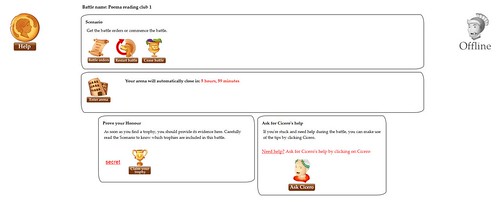
- 100% hands on training
- Virtual labs: no virtual machines needed
- 14 educational challenges
- Get hints and tips when you are stuck
- Goal based challenges: claim your trophy!
- Multi-platform: play on different targets
- Chat with fellow students during lab time
- Fits our Pentesting courses
- Prepares you for eCPPT certification
- Unlimited access for 1 or 2 months
- Enroll now and start your period later
- Access to our forums for support
eLearnSecurity are offering some exclusive bundles for Darknet readers if you are interested in getting on the Coliseum Lab to help during your pen-testing course.
If you want to learn more about the eLearnSecurity penetration testing courses, you can read our reviews here – Pentesting Student or Pentesting Professional and read their article here:
Read this before signing up for any Penetration Testing Course
The discount coupon is DARKNELS-SEPT-30 and discounts the bundles by 5% if
used before September 30th:
Professional course + 1 month in Coliseum Lab
Student course + 1 month in Coliseum Lab
Exclusively for Darknet readers you can get a free pass for Coliseum Labs here:
Coliseum Lab Demo
Please note – these offers are only valid BEFORE SEPTEMBER 30th – so don’t hang around.
nb : darknet Read More...