![[+]d'ZheNwaY's Blog[+]](http://feeds.feedburner.com/blogspot/YRtWp.1.gif)

Der Spiegel is reporting that WikiLeaks has had... wait for it... a data leakage accident. You might think, "So what? The data has already been leaked!"
Unfortunately, that isn't quite as clear as it seems. WikiLeaks goes to great lengths to protect both their sources and potential informants by redacting their details from the data before publication.
Last summer Daniel Domscheit-Berg had a dispute with Julian Assange and departed with a chunk of the WikiLeaks staff to form OpenLeaks.
In the process Domscheit-Berg was reported to have taken data from a server containing the 250,000+ leaked diplomatic cables in encrypted form and left Assange without access to the contents.
 Assange had shared the passphrase to decrypt the cables with an external source as a protective measure and expected the source to keep the key secret.
In November of 2010 Domscheit-Berg returned the files to WikiLeaks. This prompted WikiLeaks supporters to make the contents available in a public archive.
Apparently they didn't notice that the archive included a hidden directory that contained the encrypted file with the cables, and accidentally made the file public.
Assange's external source, not knowing the file was accessible to the public, for some reason publicly disclosed the key this spring.
The result? The uncensored cables are now publicly downloadable and could blow the cover of American informants around the world.
The lesson? Well, even if you are in the business of leaking secrets, you need to keep secrets. I wonder if Julian sees the irony in this incident.
WikiLeaks Twitter feed has posted a message stating "There has been no 'leak at WikiLeaks'. The issue relates to a mainstream media partner and a malicious individual."
If, like WikiLeaks, you need to keep secrets, consider downloading our free e-book, Data Leakage for Dummies.
Read More...
30/08/11
WikiLeaks suffers its own data loss incident


WebSurgery – Web Application Security Testing Suite
WebSurgery is a suite of tools for security testing of web applications. It was designed for security auditors to help them with the web application planning and exploitation. Currently, it uses an efficient, fast and stable Web Crawler, File/Dir Brute forcer, Fuzzer for advanced exploitation of known and unusual vulnerabilities such as SQL Injection, Cross site scripting (XSS), Brute force for login forms, identification of firewall-filtered rules, DOS Attacks and WEB Proxy to analyze, intercept and manipulate the traffic between your browser and the target web application.
WEB Crawler
WEB Crawler was designed to be fast, accurate, stable, completely parametrable and the use of advanced techniques to extract links from Javascript and HTML Tags. It works with parametrable timing settings (Timeout, Threading, Max Data Size, Retries) and a number of rules parameters to prevent infinitive loops and pointless scanning (Case Sensitive, Dir Depth, Process Above/Below, Submit Forms, Fetch Indexes/Sitemaps, Max Requests per File/Script Parameters). It is also possible to apply custom headers (user agent, cookies etc) and Include/Exclude Filters. WEB Crawler come with an embedded File/Dir Brute Forcer which helps to directly brute force for files/dirs in the directories found from crawling.
WEB Bruteforcer
WEB Bruteforcer is a brute forcer for files and directories within the web application which helps to identify the hidden structure. It is also multi-threaded and completely parametrable for timing settings (Timeout, Threading, Max Data Size, Retries) and rules (Headers, Base Dir, Brute force Dirs/Files, Recursive, File’s Extension, Send GET/HEAD, Follow Redirects, Process Cookies and List generator configuration).
By default, it will brute force from root / base dir recursively for both files and directories. It sends both HEAD and GET requests when it needs it (HEAD to identify if the file/dir exists and then GET to retrieve the full response).
WEB Fuzzer
WEB Fuzzer is a more advanced tool to create a number of requests based on one initial request. Fuzzer has no limits and can be used to exploit known vulnerabilities such (blind) SQL Inections and more unsual ways such identifing improper input handling, firewall/filtering rules, DOS Attacks.
WEB Editor
A simple WEB Editor to send individual requests. It also contains a HEX Editor for more advanced requests.
WEB Proxy
WEB Proxy is a proxy server running locally and will allow you to analyze, intercept and manipulate HTTP/HTTPS requests coming from your browser or other application which support proxies.
You can download WebSurgery here:
Setup – setup.msi
Portable – websurgery.zip
nb : darknet
Read More...
29/08/11
Cisco Aims for a Go-anywhere Router

Cisco Systems made its fortune selling routers for the cores of enterprise and service-provider networks, but now the company is sending its technology farther from those cozy confines than ever before.
The Cisco Integrated Services Router 819 Machine-to-Machine Gateway, available immediately, is the smallest member of the ISR family of branch and remote-office routers and is designed to withstand outdoor environments with extreme temperatures. Target markets for the device include truck fleets, tollbooths and ATMs (automated teller machines). The ISR 819 can also serve as a conventional router in a remote office, said Inbar Lasser-Raab, senior director of marketing for borderless networks.
Unlike most routers, the 819 relies primarily on cellular data to reach the Internet. This opens up more possible uses for the router, including moving vehicles. The router, which weighs only 2.3 pounds (1 kilogram) and is thicker but smaller than a tablet, starts at US$1,600. A slightly larger, hardened version, which is waterproof and has a temperature range from -13 degrees to 140 degrees Fahrenheit (-25 to 60 Celsius), starts at $2,300.
To ensure communication in isolated locations, the ISR 819 is equipped for 3G connectivity. It is available with both GSM (Global System for Mobile Communications) and CDMA (Code-Division Multiple Access) technology and has room for two SIM (Subscriber Identity Module) cards, so users can set up service with two different mobile operators for redundancy. Cisco is also eyeing 4G capability next year, though most machine-to-machine (M2M) applications aren't bandwidth-hungry.
M2M (machine-to-machine) networking is expected to grow rapidly in the coming years. Functions such as meter-reading, asset tracking and supply-level notifications can be automated through radios built into systems in the field, and wireless links can help to make it easier to network those devices.
As an example of how this type of device could work, a small wireless router in an ATM could send a signal when the amount of cash available in the machine fell to a certain level. It could immediately communicate over the cellular network to a similar router in an armored truck, and the driver of the truck would be given instructions to deliver more cash to that ATM.
Trucks, vending machines and other systems in the field have had wireless connectivity before, but Cisco calls the ISR 819 its first router for these types of applications that has all the features of the popular ISR line. For example, it includes stateful and application-inspection firewall capability, encryption for VPNs (virtual private networks), and features to optimize voice and video, according to Cisco.
There are 3G routers on the market from smaller vendors, but the fact that the 819 has the same software as Cisco's other popular ISR models is likely to make it more attractive to enterprises that have already invested in Cisco, said analyst Mike Spanbauer of Current Analysis. Cisco is more dominant in the router market for small and medium-sized companies than it is even in other areas of switching and routing, Spanbauer said.
"It's more about operational efficiency than necessarily bringing out a new service that didn't exist before," Spanbauer said.
But because so many features are built into it, the 819 may inspire new uses of remote routers in the future, he said. It will probably take less custom code and help from consultants to get a new use case off the ground, he said.
"Having the collapsed service offering on a single device does breed simplicity and encourages creativity in deployment," he said.
A renewed commitment by mobile operators could also help to boost the use of machine-to-machine applications, said IDC analyst Rohit Mehra. Some carriers have been slow to support machine-to-machine because they were focused on keeping up with consumers' use of mobile data on smartphones, he said. M2M will be an important source of market growth now that almost all consumers have cellphones.
nb : pcworld
Read More...
Microsoft Throws Support Behind USB 3.0 With Windows 8
Microsoft is incorporating a software stack in its upcoming Windows 8 OS to natively support devices based on the USB 3.0 interconnect, which is in a battle for adoption with Intel's Thunderbolt.
USB 3.0 is the successor to USB 2.0 standard and can transfer data 10 times faster between computers and external peripherals such as cameras and storage devices. Most laptops and desktops today come with USB 2.0 ports and many PC makers are offering USB 3.0 ports as an option. The current Windows 7 OS does not include native support for USB 3.0, but device makers offer drivers to ensure products are compatible with the OS.
The growing support for USB 3.0 and wide usage of USB 2.0 was a compelling reason to improve the USB software stack, said Dennis Flanagan, Microsoft's director of program management for the devices and networking group, in an entry on the company's Building Windows 8 blog.
 "By 2015, all new PCs are expected to offer USB 3.0 ports, and over 2 billion new 'SuperSpeed' USB devices will be sold in that year alone," Flanagan wrote.
Microsoft is writing a new software stack and controller for Windows 8 based on the "design principles" of USB 3.0, which will bring plug-and-play support for new devices such as external storage, webcams and keyboards, Flanagan wrote. The company is retaining the existing software stack to support older USB devices.
But there are few USB 3.0 devices available today, so to create the new software stack the company had to simulate and build virtual USB 3.0 hardware, including ports, hubs and devices.
The hardware support for USB 3.0 is also growing. Intel has already said it will integrate USB 3.0 support in chipsets for processors code-named Ivy Bridge, which will reach PCs early next year. AMD has already integrated support for USB 3.0 in its Fusion chipsets, which are already shipping for PCs.
USB 3.0 transfers data at speeds of up to 5 gigabits per second, which is slower than the transfer speed of rival interconnect technology Thunderbolt. Developed by Intel, Thunderbolt can transfer data between host computers and external devices such as displays and storage at up to 10 gigabits per second. Thunderbolt has been viewed as an alternative to USB 3.0, but Intel has the said the technologies are complementary. Apple uses Thunderbolt in its products.
Thunderbolt currently supports the PCI Express and DisplayPort protocols, and the interconnect does not require any OS support beyond existing software stacks for those protocols, an Intel spokesman said in an e-mail.
But Microsoft's backing will aid the fast growth of USB 3.0 and provide higher transfer speeds for consumer devices, said Jim McGregor, research director at In-Stat.
"Thunderbolt will be one of many peripheral options available, just like IEEE1394 and Firewire, but I think USB will be the predominant interface because it is so heavily tied to the largest growth segment of the market, mobile devices, for both interconnectivity and power," McGregor said.
Thunderbolt is based on copper wires, but ultimately will be based on optical technology. That will boost the interconnect's transfer speed and distance, Intel has said.
"[USB 3.0] will still not be as fast as the Thunderbolt optic link, but copper never will be as fast as optics," McGregor said.
Wireless charging could trump both USB 3.0 and Thunderbolt, provided it takes off, McGregor said. The transfer speeds may not be as fast, but device makers are showing interest in the technology, he said.
"It may eventually eliminate the need for peripheral connectors on mobile devices and then everyone will look to wireless interfaces," McGregor said.
Other than enthusiast users, drivers aren't something average PC users need to worry about, but native support for USB 3.0 in Windows 8 can't hurt, said Nathan Brookwood [CQ], principal analyst at Insight 64.
"When they are talking about the history of Windows 8, they are going to be talking about the user interface and ... touch," Brookwood said.
nb : pcworld
Read More...
Best Free Software for Protecting Your PC and Your Privacy
(For links to all of these downloads in one convenient list, see our "Best Free Software for Protecting Your PC and Your Privacy" collection.)
Protect Against Malware
Malware is the most dangerous threat you'll come across online. Viruses, Trojan horses, and other types of malware can do immeasurable damage to your PC, steal your private information, and even turn your PC into a zombie that spews spam or carries out an attacker's commands. No need to be a victim, though; these freebies will keep you safe.Microsoft Security Essentials

About as simple to use as protection software gets, Microsoft Security Essentials sits in the background, scanning the programs you run to determine whether they're malware and then disposing of any that prove to be dangerous. In addition, it regularly scans your system to make sure no infections have gotten through. It's straightforward, clean, and free, a hard combination to beat.
Avast Free Antivirus

This well-designed, speedy antimalware tool is easy to use, and PCWorld rated it as the top free antivirus program. Like Microsoft's freebie, Avast Free Antivirus is a set-and-forget utility. Just run it and set the options, and it handles the rest on its own. Its scans are exceptionally fast, and it uses few system resources, so you won't need to spend much time with it. You probably won't even notice that it's running.
Spybot Search & Destroy

This longtime spyware killer is one of the most popular files in PCWorld's Downloads library, and with good reason. Spybot Search & Destroy, as its name implies, is dedicated to eliminating spyware, and it does a great job. It scans your PC to catch offending spyware, including tracking cookies and spyware apps. It also inoculates your machine against getting infected in the first place.
Comodo Firewall
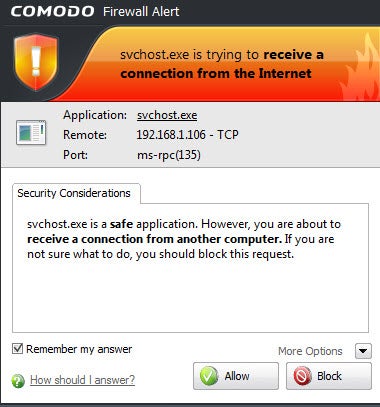
Every PC needs a good firewall, software that blocks applications on the computer from making unsafe outbound connections. A firewall is especially useful because Trojan horses typically try to make outbound connections; a firewall will also help to prevent your PC from becoming a zombie and doing an attacker's bidding. Comodo Firewall is a very good choice that blocks Trojan horses, stymies hackers attempting to take control of your PC, and wards off other threats. Note that using it takes a bit of work, since you have to let it know which programs are safe and should be allowed to have outbound connections. But setting that up is a small annoyance in light of the protection Comodo offers.
Stay Safe at Hotspots
When you use a Wi-Fi hotspot at a café, airport, or other public location, your PC and your privacy are particularly vulnerable. In such places it's exceptionally easy for anyone in the area to snoop on your activities as you browse the Web, especially since the advent of the free Firesheep extension that allows anyone without coding experience to steal your Facebook and Twitter identities as well as your logins at other sites. Guard your machine and your data with the following free software.CyberGhost VPN

The CyberGhost VPN utility sets up a virtual private network when you connect to the Internet. Simply install and run the software, and hop online. It hides your true IP address and connects you to anonymous servers. In fact, don't feel limited to using it at hotspots--you can also use it whenever you wish to guard your privacy while you surf the Internet.
Note, however, that CyberGhost VPN has a couple of limitations. First, the free version is good for only a 6-hour session or 1GB of downloads; after that, you'll have to restart the session. Second, it typically connects you to servers in Europe, so you may not be able to connect to, say, the U.S. version of Google. If those restrictions are deal-breakers, you could invest in the for-pay service. But if you're spending 6 hours at a time hunkered over your PC in a coffee shop, you may want to rethink your workflow anyway.
HTTPS Everywhere

The free Firefox add-in HTTPS Everywhere is designed to protect your privacy when you visit specific sites, including Facebook, Google Search, the New York Times, Paypal, Twitter, the Washington Post, and Wikipedia. It's an ideal tool for fending off Firesheep hackers. Note that it protects you only on sites that employ the HTTPS secure protocol, and that it can't help when you're using online services other than Web surfing, such as email and instant messaging. Still, it's a great way to stay safe at certain websites.
Hotspot Shield
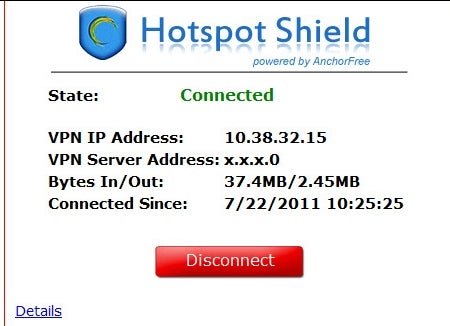
This freebie does exactly what its name suggests: Hotspot Shield protects you when you're connected to a hotspot, by encrypting all of your data packets. When you install it, make sure to decline the extra toolbars. And if you don't want your home page and default search engine to change, uncheck those options as well during installation.
TrackMeNot
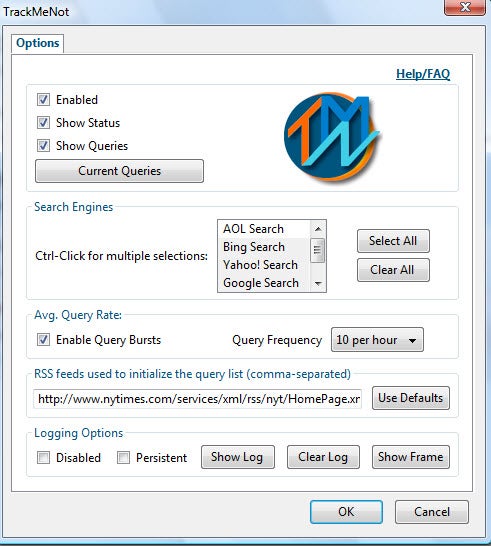
Every time you perform a Web search, you give up a bit of your privacy. Search engines track your search terms, and they can build profiles about your interests based on what you search for. The free TrackMeNot add-in for Firefox and TrackMeNot add-in for Chrome cleverly thwart such behavior, bombarding search engines with random search terms gleaned from news sites and creating so much "noise" about you that no profile can be created.
Secure Your PC
Finally, you'll want to secure your PC itself--its contents as well as any passwords you've stored on it. The next three freebies will do the work for you.KeePass

You have plenty of passwords you use every month, for websites, ATMs, email services, and more. Most likely, you've stored them somewhere on your PC--which means that they can be stolen. Lock them away with KeePass, which hides them in an encrypted database so that only you can use them. In addition, the tool will create industrial-strength passwords for you, making it less likely that anyone will be able to break them.
FreeOTFE

Worried that a snoop can walk by your PC when you're not around, and then access all of its files and applications? Concerned about what might happen to your files and data if you lose your laptop? FreeOTFE can encrypt files and folders--or your entire hard disk--and then decrypt the data on the fly as you use it. This utility isn't necessarily the easiest program to use, but it does its job nicely.
Secunia PSI

You already know that you should take care of any vulnerabilities in your PC's operating system, but you might be surprised to learn that out-of-date applications can contain security flaws and pose significant problems too. If you have installed applications but neglected to regularly update and patch them, your computer may be at risk. Secunia PSI closes the holes through which malware can slither. The tool scans the software on your system, determines which programs are outdated, and then helps you install patches.